Service Certificates
Store and manage certificates from external services (ISE, pfSense, LDAP, etc.) for proper SSL/TLS verification in automation scripts.
Overview
When connecting to services with self-signed or enterprise CA-signed certificates, Python’s SSL verification fails unless you provide the CA certificate. This page documents how to extract, store, and configure certificates for each domain.

Directory Structure
Certificates are organized by domain and service:
~/.secrets/certs/
├── d000/                          # Home lab domain
│   ├── ise/
│   │   ├── ROOT-CA.crt            # Admin/ERS/MnT/OpenAPI (CA cert)
│   │   ├── dataconnect.crt        # DataConnect (self-signed Oracle)
│   │   └── pxgrid.crt             # pxGrid (port 8910)
│   ├── pfsense/
│   │   └── admin.crt
│   └── ldap/
│       └── ca.crt
├── d001/                          # Work domain
│   └── ise/
│       ├── ROOT-CA.crt
│       ├── dataconnect.crt
│       └── pxgrid.crt
└── d002/                          # Client domain
    └── ...
Naming convention: ~/.secrets/certs/<domain>/<service>/<name>.crt
| Component | Description |
|---|---|
|
Environment identifier (d000=home, d001=work, etc.) |
|
Service category (ise, pfsense, ldap, etc.) |
|
Specific certificate (admin, dataconnect, ca, etc.) |
ISE Certificates
ISE uses three different certificates:
| Certificate | Port(s) | Type | Environment Variable |
|---|---|---|---|
ROOT-CA |
443, 9060 |
CA certificate (signs Admin/ERS) |
|
DataConnect |
2484 |
Self-signed Oracle cert |
|
pxGrid |
8910 |
pxGrid controller cert |
|
ERS (9060) and Admin GUI (443) use the same CA. You only need ROOT-CA.crt for both.
|
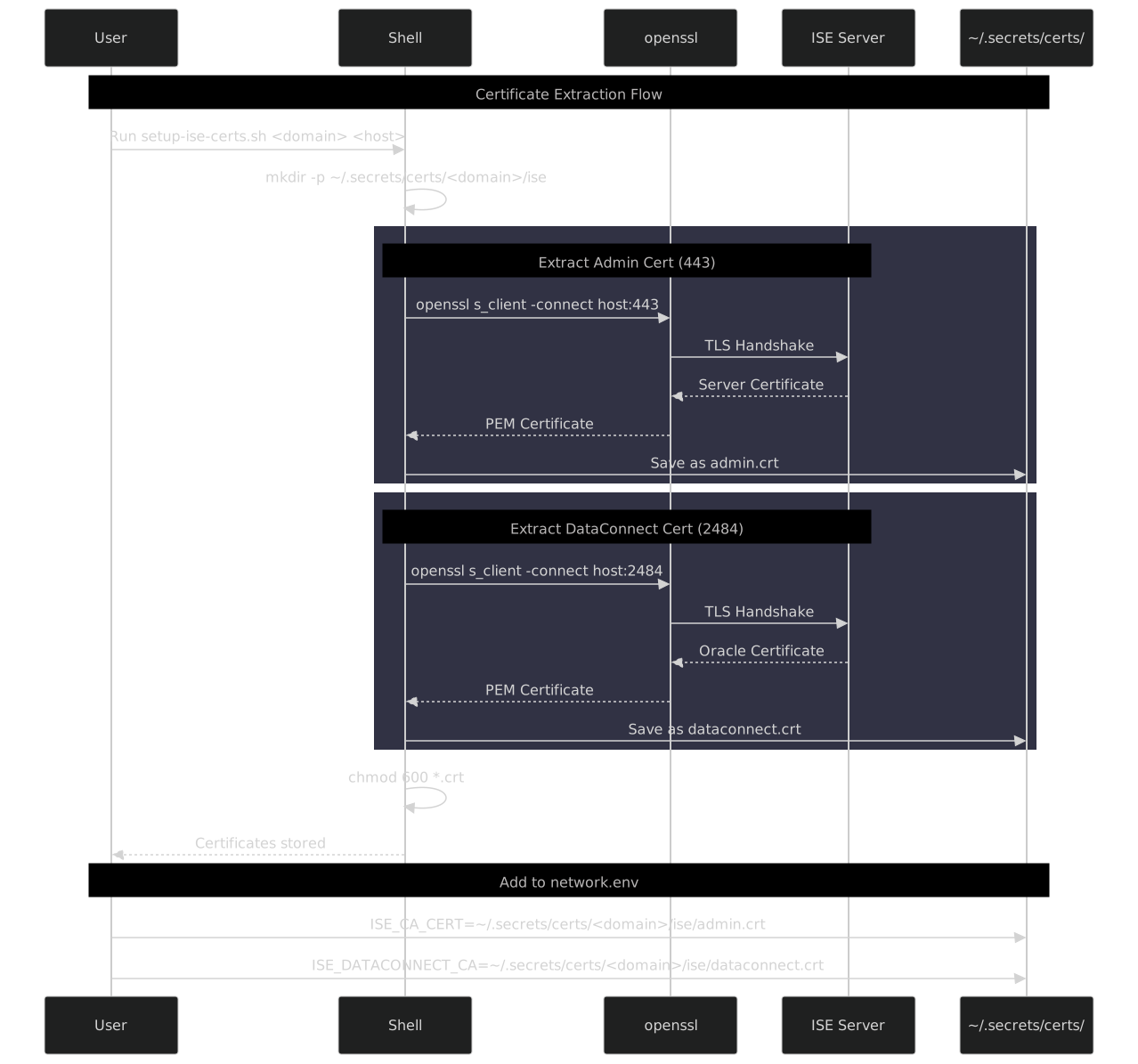
Quick Setup (Script)
For automation, use the full script in Full Setup Script.
Step-by-Step Setup
Copy-paste each command one at a time.
Step 1: Set variables
DOMAIN="<your-domain>"      # e.g., d000, d001
ISE_HOST="<ise-ip-or-fqdn>" # e.g., 10.50.1.21, ise.example.com
CERT_DIR="$HOME/.secrets/certs/$DOMAIN/ise"
Step 3: Extract ROOT-CA cert (port 443)
Used by Admin GUI, ERS, MnT, OpenAPI.
Use -showcerts and extract the LAST cert (root CA), not the first (server cert).
|
echo | timeout 5 openssl s_client -connect "$ISE_HOST:443" -showcerts 2>/dev/null | \
  awk '/-----BEGIN CERTIFICATE-----/{buf=""} {buf=buf $0 ORS} /-----END CERTIFICATE-----/{last=buf} END{printf "%s", last}' > "$CERT_DIR/ROOT-CA.crt"
Step 5: Extract DataConnect cert (port 2484)
Self-signed Oracle cert for DataConnect.
echo | timeout 5 openssl s_client -connect "$ISE_HOST:2484" 2>/dev/null | \
sed -n '/BEGIN CERT/,/END CERT/p' > "$CERT_DIR/dataconnect.crt"Full Setup Script
For automated extraction:
#!/bin/bash
# setup-ise-certs.sh <domain> <ise_host>
DOMAIN="${1:?Usage: $0 <domain> <ise_host>}"
ISE_HOST="${2:?Usage: $0 <domain> <ise_host>}"
CERT_DIR="$HOME/.secrets/certs/$DOMAIN/ise"
mkdir -p "$CERT_DIR" && chmod 700 "$CERT_DIR"
echo "=== Extracting ISE certificates for $DOMAIN ==="
# ROOT-CA cert (443) - Admin/ERS/MnT/OpenAPI
# NOTE: Use -showcerts and extract the LAST cert (root CA), not the first (server cert)
echo -n "ROOT-CA (443)... "
echo | timeout 5 openssl s_client -connect "$ISE_HOST:443" -showcerts 2>/dev/null | \
awk '/-----BEGIN CERTIFICATE-----/{buf=""} {buf=buf $0 ORS} /-----END CERTIFICATE-----/{last=buf} END{printf "%s", last}' > "$CERT_DIR/ROOT-CA.crt"
[ -s "$CERT_DIR/ROOT-CA.crt" ] && echo "OK" || echo "FAILED"
# DataConnect cert (2484)
echo -n "DataConnect (2484)... "
echo | timeout 5 openssl s_client -connect "$ISE_HOST:2484" 2>/dev/null | \
sed -n '/BEGIN CERT/,/END CERT/p' > "$CERT_DIR/dataconnect.crt"
[ -s "$CERT_DIR/dataconnect.crt" ] && echo "OK" || echo "FAILED"
# pxGrid cert (8910)
echo -n "pxGrid (8910)... "
echo | timeout 5 openssl s_client -connect "$ISE_HOST:8910" 2>/dev/null | \
  sed -n '/BEGIN CERT/,/END CERT/p' > "$CERT_DIR/pxgrid.crt"
[ -s "$CERT_DIR/pxgrid.crt" ] && echo "OK" || echo "FAILED"
chmod 600 "$CERT_DIR"/*.crt 2>/dev/null
ls -la "$CERT_DIR"Configure Environment
Add to your domain’s network.env:
# ~/.secrets/environments/domains/<domain>/dev/network.env.age
# ISE Connection
ISE_PAN_IP=10.50.1.20
ISE_MNT_IP=10.50.1.21
ISE_API_USER=ersadmin
ISE_API_PASS=<password>
# Certificate Paths (enables proper SSL verification)
ISE_CA_CERT=~/.secrets/certs/<domain>/ise/ROOT-CA.crt
ISE_DATACONNECT_CA=~/.secrets/certs/<domain>/ise/dataconnect.crt
ISE_PXGRID_CA=~/.secrets/certs/<domain>/ise/pxgrid.crtTest Configuration
# Load domain credentials
eval "$(DSEC_EVAL_VERIFIED=true dsec source d000 dev/network)"

# Test ERS (uses ISE_CA_CERT)
uv run netapi ise get-nodes

# Test DataConnect (uses ISE_DATACONNECT_CA)
uv run netapi ise dc test
Verify Certificates
Always inspect certificates before trusting:
# View certificate details
openssl x509 -in ~/.secrets/certs/d000/ise/admin.crt -text -noout | head -30

# Check fingerprint
openssl x509 -in ~/.secrets/certs/d000/ise/admin.crt -noout -fingerprint -sha256

# Compare with live server
echo | openssl s_client -connect 10.50.1.21:443 2>&1 | \
  openssl x509 -noout -fingerprint -sha256
Certificate Renewal
When service certificates are renewed, update stored copies:
#!/bin/bash
# renew-ise-certs.sh <domain> <ise_host>

DOMAIN="${1:-d000}"
ISE_HOST="${2:-10.50.1.21}"
CERT_DIR="$HOME/.secrets/certs/$DOMAIN/ise"

echo "=== Renewing ISE certificates for $DOMAIN ==="

# Backup existing
mkdir -p "$CERT_DIR/backup"
cp "$CERT_DIR"/*.crt "$CERT_DIR/backup/" 2>/dev/null

# Extract and compare
for port_name in "443:admin" "2484:dataconnect"; do
  port="${port_name%%:*}"
  name="${port_name##*:}"

  echo -n "Checking $name (port $port)... "
  if echo | timeout 5 openssl s_client -connect "$ISE_HOST:$port" 2>/dev/null | \
     sed -n '/BEGIN CERT/,/END CERT/p' > "$CERT_DIR/$name.crt.new" && \
     [ -s "$CERT_DIR/$name.crt.new" ]; then

    if [ -f "$CERT_DIR/$name.crt" ]; then
      old_fp=$(openssl x509 -in "$CERT_DIR/$name.crt" -noout -fingerprint -sha256 2>/dev/null)
      new_fp=$(openssl x509 -in "$CERT_DIR/$name.crt.new" -noout -fingerprint -sha256)

      if [ "$old_fp" = "$new_fp" ]; then
        echo "unchanged"
        rm "$CERT_DIR/$name.crt.new"
      else
        echo "UPDATED"
        mv "$CERT_DIR/$name.crt.new" "$CERT_DIR/$name.crt"
      fi
    else
      mv "$CERT_DIR/$name.crt.new" "$CERT_DIR/$name.crt"
      echo "created"
    fi
  else
    echo "FAILED"
    rm -f "$CERT_DIR/$name.crt.new"
  fi
done
Interactive SSL Fallback
When netapi encounters SSL errors without a configured CA, it prompts:
$ netapi ise dc test

SSL verification failed for 10.50.1.21:2484
  Error: certificate verify failed
  Subject: O=Cisco Systems, CN=ISE_ORACLE_ise-02.inside.domusdigitalis.dev

Options:
  [y] Proceed insecurely (this time only)
  [n] Abort (default)
  [s] Save INSECURE=true preference
  [c] Extract certificate and save to ~/.secrets/certs/

Choice [y/n/s/c]: c

Certificate saved: ~/.secrets/certs/d000/ise/dataconnect.crt
  Subject: O=Cisco Systems, CN=ISE_ORACLE_ise-02...
  Expires: Jan 13 02:01:10 2027 GMT

Add to your network.env:
  ISE_DATACONNECT_CA=~/.secrets/certs/d000/ise/dataconnect.crt

Retrying with certificate verification...
Connected to ISE DataConnect
Other Services
pfSense
# Extract pfSense admin cert
PFSENSE_HOST="10.50.1.1"
CERT_DIR="$HOME/.secrets/certs/d000/pfsense"
mkdir -p "$CERT_DIR"

echo | openssl s_client -connect "$PFSENSE_HOST:443" 2>/dev/null | \
  sed -n '/BEGIN CERT/,/END CERT/p' > "$CERT_DIR/admin.crt"

# Add to network.env
echo "PFSENSE_CA_CERT=~/.secrets/certs/d000/pfsense/admin.crt"Environment Variable Reference
| Variable | Service | Description |
|---|---|---|
|
ISE ERS/MnT/OpenAPI |
ROOT-CA cert for REST APIs (port 443, 9060) |
|
ISE DataConnect |
Self-signed Oracle cert (port 2484) |
|
ISE pxGrid |
pxGrid controller cert (port 8910) |
|
ISE (legacy) |
Fallback for |
|
pfSense |
Admin interface certificate |
|
LDAP/AD |
LDAPS certificate |
Security Considerations
-
Verify before trusting: Always check fingerprints match expected values
-
Restrict permissions:
chmod 600on all certificate files -
Separate by domain: Don’t mix production and lab certificates
-
Monitor expiration: Set calendar reminders for certificate renewals
-
Don’t commit: Add
~/.secrets/certs/to.gitignore