CLI Reference Overview
This section covers the netapi command-line interface:
-
ISE Commands — Cisco ISE API operations (ERS, MnT, DataConnect)
-
WLC Commands — Cisco 9800 WLC WLAN management
-
IOS Commands — Cisco IOS/IOS-XE switch management via SSH
-
pfSense Commands — pfSense firewall management
-
Synology Commands — Synology NAS management
-
Keycloak Commands — Keycloak IdP management
-
Run Commands — Automata workflows (emergency response, health checks)
-
Documentation Scraper — Scrape vendor documentation to AsciiDoc/Markdown
Command Groups
| Command | Description |
|---|---|
|
Cisco ISE ERS, MnT, and DataConnect APIs |
|
Keycloak Admin API (realms, users, groups, clients, SAML) |
|
Cisco IOS/IOS-XE commands (AAA testing) |
|
Cisco 9800 WLC commands |
|
pfSense firewall commands |
|
Synology NAS commands |
|
Documentation scraping tools |
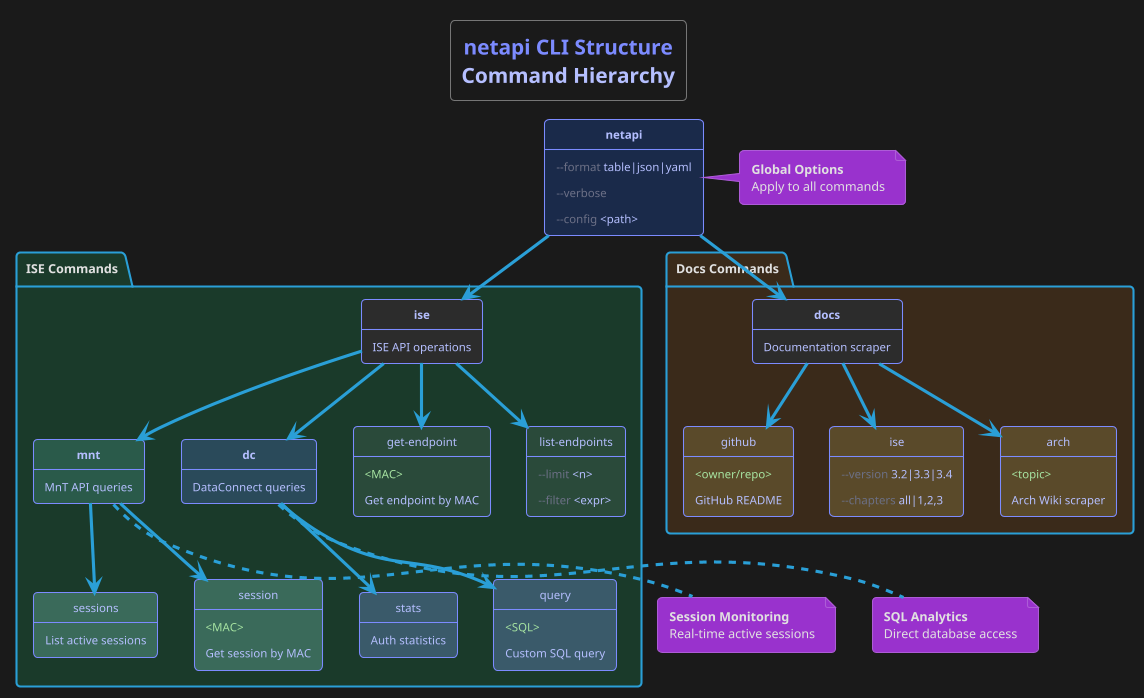
Quick Examples
# ISE: List active sessions
netapi ise mnt sessions

# ISE: Get endpoint by MAC
netapi ise get-endpoint C8:5B:76:C6:59:62

# ISE: JSON output for jq
netapi ise mnt --format json sessions | jq '.[0]'

# Keycloak: List user's groups
netapi keycloak user-groups domusdigitalis evanusmodestus

# Keycloak: Get SAML metadata for ISE
netapi keycloak get-saml-metadata domusdigitalis -o /tmp/metadata.xml

# Keycloak: Add user to admin group
netapi keycloak add-user-to-group domusdigitalis evanusmodestus ise-super-admin

# WLC: List all WLANs
netapi wlc wlans

# WLC: Deploy a complete SSID (WLAN + Policy + Tag)
netapi wlc deploy-ssid Domus-Secure --id 1 --vlan 10 \
    --security dot1x --auth-list ISE-AUTH

# WLC: Deploy IoT SSID with PSK
netapi wlc deploy-ssid Domus-IoT --id 2 --vlan 40 \
    --security wpa2-psk --psk "IoTSecret123!"

# Scrape Cisco ISE docs
netapi docs ise --version 3.4 --chapters 1,2
Global Options
| Option | Short | Description |
|---|---|---|
|
|
Output format: |
|
|
Enable verbose logging |
|
|
Path to config file |
|
|
Show help message |
Session Logging
Log netapi command output for documentation or troubleshooting.
Using tee
# New file (overwrite)
netapi ise get-endpoints 2>&1 | tee session.log

# Append to existing file
netapi ise get-endpoints 2>&1 | tee -a session.log

# With timestamp header (new file)
{
  echo "=== $(date) ==="
  netapi ise get-endpoints
} 2>&1 | tee session.log

# Append multiple commands to existing log
{
  echo "=== $(date) ==="
  netapi ise get-endpoints
  netapi ise get-authz-profiles
} 2>&1 | tee -a session.log

# Stderr only (errors to file, stdout to screen)
netapi ise get-endpoints 2>&1 >/dev/null | tee errors.log

# Both stdout and stderr to different files
netapi ise get-endpoints > stdout.log 2> stderr.log

# Silent (file only, no screen output)
netapi ise get-endpoints 2>&1 | tee session.log > /dev/null| Flag | Effect |
|---|---|
|
Overwrite file |
|
Append to file |
|
Capture stderr too |
|
Suppress screen output |
Quick tlog function
Add to ~/.zshrc or ~/.bashrc:
PRINCIPIA_CAPTURES="$HOME/atelier/_bibliotheca/Principia/03_Captures"

tlog() {
  tee -a "$PRINCIPIA_CAPTURES/$(date +%Y/%m)/LOG-$(date +%Y-%m-%d)-${1:-manual}.txt"
}
Usage:
# Logs to LOG-2026-01-23-chla-ise.txt
netapi ise get-endpoints 2>&1 | tlog chla-ise

# Multiple commands
{
  netapi ise get-endpoints
  netapi ise mnt sessions
} 2>&1 | tlog chla-session
Full session capture
For interactive sessions with full shell features:
capture-cmd chla-netapi    # Start recording
netapi ise get-endpoints   # Run commands...
exit                       # Stop and save
See Troubleshooting for capture function setup.