ISE CLI Commands
Overview
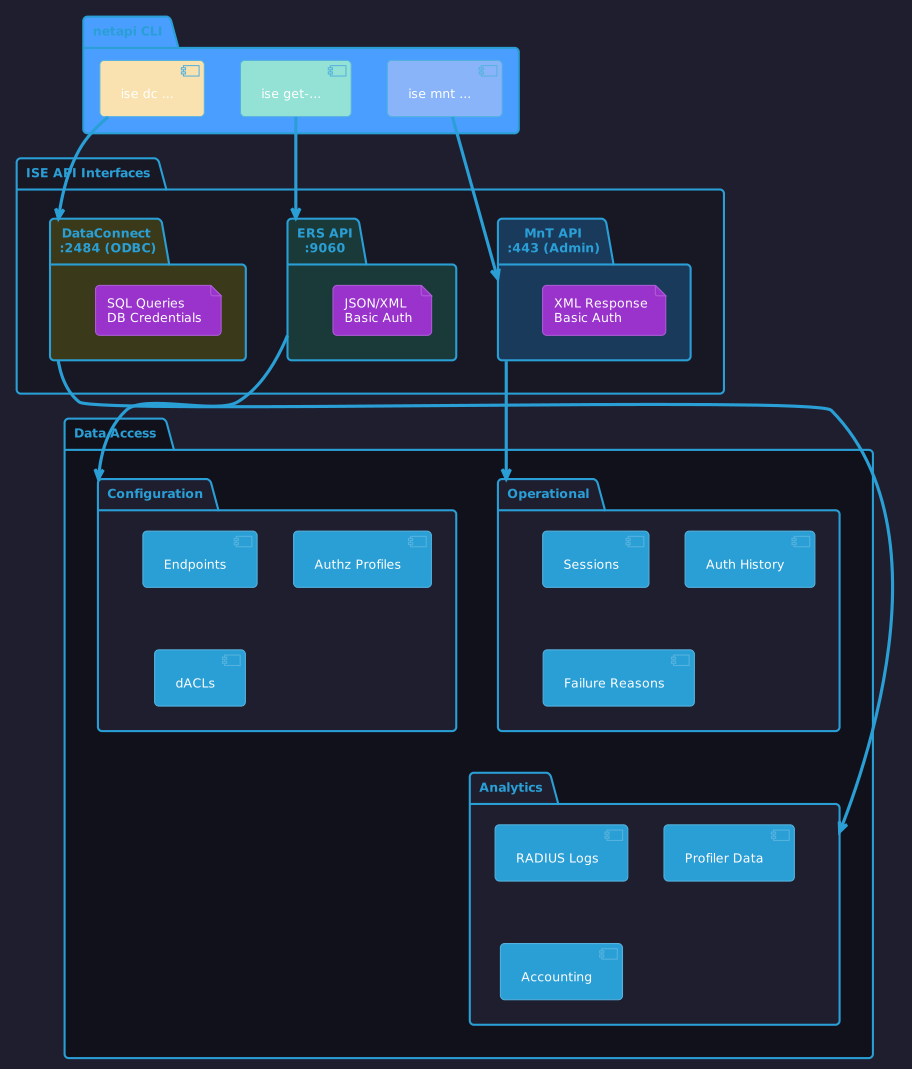
The netapi ise command group provides comprehensive access to Cisco Identity Services Engine (ISE) through multiple API interfaces.
| API | Description | Port |
|---|---|---|
Monitoring & Troubleshooting - Sessions, auth status, failure reasons |
443 (Admin) |
|
External RESTful Services - CRUD for endpoints, groups, profiles |
9060 |
|
ODBC/SQL access to ISE database - Advanced queries |
2484 |
Quick Reference
# MnT - Session monitoring
netapi ise mnt sessions
netapi ise mnt session 00:11:22:33:44:55
netapi ise mnt auth-status 00:11:22:33:44:55

# ERS - Configuration management
netapi ise get-endpoints
netapi ise get-authz-profiles
netapi ise get-dacls

# DataConnect - Database queries
netapi ise dc test
netapi ise dc profiler --hours 24
netapi ise dc recent --hours 1
Environment Setup
# Load ISE credentials via dsource
eval "$(dsource d000 dev/network)"

# Or export manually
export ISE_PAN_IP=10.50.1.10
export ISE_API_USER=admin
export ISE_API_PASS='SecurePass!'
Output Formats
All ISE commands support multiple output formats for scripting and integration.
| Format | Flag | Use Case |
|---|---|---|
|
|
Human-readable, colored terminal output |
|
|
jq piping, API integration, scripting |
|
|
yq piping, Ansible playbooks |
|
|
xq piping, XSLT transforms, legacy integration |
# JSON for jq (jq colors output by default)
netapi ise --format json get-policy-sets | jq '.[].name'

# YAML for yq
netapi ise --format yaml get-endpoints | yq '.[] | select(.mac == "00:11:22:33:44:55")'

# XML for xq (converts to JSON for jq querying)
netapi ise --format xml authz "Corp WIFI" | xq .

# XML with syntax highlighting (colored)
netapi ise --format xml get-policy-sets | bat -l xml

# Table output is default
netapi ise get-authz-profiles
The --format flag must come before the subcommand (e.g., netapi ise --format json get-policy-sets).
|
Install bat for colored XML/YAML output: sudo pacman -S bat or brew install bat
|