Linux AD Authentication dACL Runbook
1. Executive Summary
|
This is a HOME ENTERPRISE deployment, not a lab or test environment. All configurations follow enterprise security standards with production-grade infrastructure. Infrastructure Change: Migrated from Windows Server 2022 to Windows Server 2025 (home-dc01). |
2. Deployment Status
| Component | Status | Priority | Notes |
|---|---|---|---|
Infrastructure |
|||
ISE 3.4 (ise-01.inside.domusdigitalis.dev) |
PASS |
REQUIRED |
Primary PAN/MnT/PSN, all APIs validated |
Domain Controller (home-dc01) |
PASS |
REQUIRED |
Windows Server 2025 Core — fresh deployment |
Vault PKI |
PASS |
REQUIRED |
DOMUS-ROOT-CA → DOMUS-ISSUING-CA (pki_int) |
ISE Policy Objects - dACLs |
|||
dACL: DACL_Research_Onboard |
PENDING |
REQUIRED |
MAB onboarding - broad access (temporary) |
dACL: Linux-Research-AD-Auth |
PENDING |
REQUIRED |
EAP-TLS - permits AD traffic, blocks RFC1918 lateral |
ISE Policy Objects - Authz |
|||
Authz Profile: Linux_Research_Onboard |
PENDING |
REQUIRED |
References DACL_Research_Onboard, VLAN assignment |
Authz Profile: Linux-Research-AD-Auth |
PENDING |
REQUIRED |
References Linux-Research-AD-Auth, VLAN assignment |
Authz Rule in Wired_802.1X_Closed |
PENDING |
REQUIRED |
EAP-TLS + AD group match → Linux-Research-AD-Auth |
Test Endpoint: modestus-aw |
|||
802.1X Wired |
PASS |
REQUIRED |
Wired-802.1X-Vault on enp44s0 |
802.1X WiFi |
PASS |
REQUIRED |
Domus-Secure-802.1X on wlo1 |
Domain Join |
PENDING |
REQUIRED |
Verify against new DC |
AD SSH (domain account) |
NOT READY |
REQUIRED |
Blocked by current dACL — this runbook fixes it |
3. Architecture Overview
| Component | Hostname | IP Address |
|---|---|---|
Domain Controller |
home-dc01 (Windows Server 2025 Core) |
10.50.1.50 |
ISE Primary |
ise-01.inside.domusdigitalis.dev (ISE 3.4) |
10.50.1.20 |
Vault PKI |
vault-01 (pki_int issuing CA) |
10.50.1.60 |
Access Switch |
switch-01.inside.domusdigitalis.dev |
10.50.1.10 |
Firewall/Gateway |
vyos.inside.domusdigitalis.dev |
10.50.1.1 |
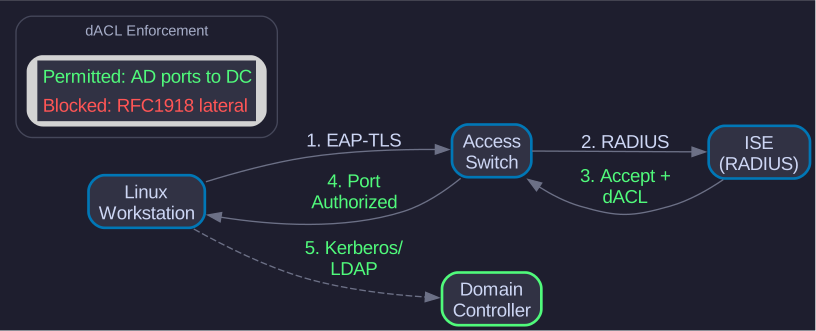
3.2. dACL Comparison
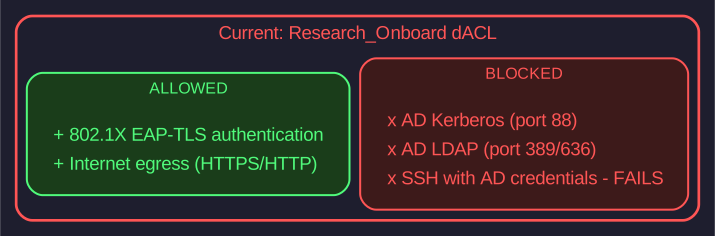
Figure 2. Problem: Research_Onboard dACL
|
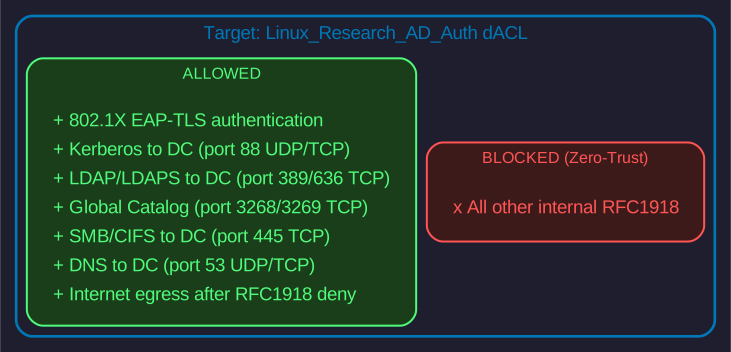
Figure 3. Solution: Linux_Research_AD_Auth dACL
|
4. Phase 0: Discovery
|
Discover BEFORE you define. Query the environment to find available values, then set variables based on what exists. This makes the runbook portable to any ISE deployment. |
4.1. 0.1 Load ISE Credentials
|
Admin Workstation
Run on modestus-razer (or any workstation with netapi + ISE credentials) |
dsource d000 dev/network4.2. 0.2 Discover ISE Nodes
# ISE Deployment Nodes
netapi ise api-call openapi GET '/api/v1/deployment/node' | \
jq -r '.response[] | "\(.hostname) - \(.roles | join(", "))"'ise-01 - PrimaryAdmin, PrimaryMonitoring
4.3. 0.3 Discover Policy Sets
# Policy Sets with status indicators and hit counts
echo -e "\e[1;37m  #  POLICY SET                    HITS    STATE\e[0m"
echo -e "\e[90m  ─────────────────────────────────────────────────\e[0m"
netapi ise api-call openapi GET '/api/v1/policy/network-access/policy-set' | \
  jq -r '.response[] | "\(.rank)|\(.name)|\(.hitCounts // 0)|\(.state)"' | \
  while IFS='|' read rank name hits state; do
    if [[ "$state" == "enabled" ]]; then
      printf "  \e[1;33m%d\e[0m  \e[1;36m%-28s\e[0m \e[1;32m%6s\e[0m  \e[1;32m●\e[0m\n" "$rank" "$name" "$hits"
    else
      printf "  \e[90m%d\e[0m  \e[90m%-28s\e[0m \e[90m%6s\e[0m  \e[1;31m○\e[0m\n" "$rank" "$name" "$hits"
    fi
done# POLICY SET HITS STATE ───────────────────────────────────────────────── 0 Domus-Wired MAB 15 ● 1 Domus-Wired 802.1X 10³ ● 2 Default 1 ●
Select your target policy set from the list above.
4.4. 0.4 Discover Existing dACLs
# List all dACLs (ERS API)
netapi ise api-call ers GET '/ers/config/downloadableacl' | \
jq -r '.SearchResult.resources[] | .name'DACL_Discovery
DACL_Research_Onboard
DENY_ALL_DACL
PERMIT_ALL_DACLCheck if your target dACL already exists.
4.5. 0.5 Discover Authorization Profiles
# List Authorization Profiles (ERS API, filtered)
netapi ise api-call ers GET '/ers/config/authorizationprofile' | \
jq -r '.SearchResult.resources[] | select(.name | startswith("Domus") or startswith("Linux")) | .name'Domus-Wired-Base Linux-Research-AD-Auth
5. Prerequisites
5.1. Set Variables (Based on Discovery)
|
Admin Workstation
Now set variables using values discovered above. Replace placeholders with your discovered values. |
# --- DISCOVERED VALUES (from Phase 0) ---
MAC="14:F6:D8:7B:31:80"              # From 0.6 - endpoint MAC
DC_IP="10.50.1.50"                   # From 0.7 - domain controller IP
POLICY_SET="Wired_802.1X_Closed"      # From 0.3 - target policy set

# --- dACLs (2 required) ---
DACL_ONBOARD="DACL_Research_Onboard"        # MAB onboarding - broad access
DACL_EAPTLS="Linux-Research-AD-Auth"         # EAP-TLS - AD auth, zero-trust

# --- Authorization Profiles ---
AUTHZ_ONBOARD="Linux_Research_Onboard"
AUTHZ_EAPTLS="Linux-Research-AD-Auth"

# --- LOGGING ---
LOGFILE="/tmp/ise-dacl-validation-$(date +%Y%m%d-%H%M%S).log"

echo "Variables set | ISE: $ISE_PAN_IP | MAC: $MAC"
echo "  dACLs: $DACL_ONBOARD (onboard), $DACL_EAPTLS (eaptls)"
echo " Log: $LOGFILE"Variables set | ISE: 10.50.1.20 | MAC: 14:F6:D8:7B:31:80
dACLs: DACL_Research_Onboard (onboard), Linux-Research-AD-Auth (eaptls)
Log: /tmp/ise-dacl-validation-20260213-143052.log|
Portable to other environments: For enterprise deployments, run Phase 0 discovery first, then populate these variables with the discovered values. |
6. Phase 1: Pre-Configuration Validation
|
Validate BEFORE you create. The order matters:
|
6.1. 1.1 Validate ISE Policy Set Exists
|
Admin Workstation
Confirm the target policy set exists before creating objects. |
echo "=== 1.1 Policy Sets ===" | tee -a "$LOGFILE"
netapi ise get-policy-sets 2>&1 | tee -a "$LOGFILE"
echo "" | tee -a "$LOGFILE"
netapi ise get-policy-set "$POLICY_SET" 2>&1 | tee -a "$LOGFILE"|
If the policy set doesn’t exist, create it first or use a different policy set name. |
6.2. 1.2 Validate AD Connectivity
Test that the DC is reachable on all required ports. Run from both workstations to compare results.
-
Admin Workstation
-
Test Endpoint
echo "" | tee -a "$LOGFILE"
echo "=== 1.2 AD Connectivity (Admin) ===" | tee -a "$LOGFILE"
{
  echo -n "DNS (53/tcp)....... "; timeout 3 bash -c "</dev/tcp/$DC_IP/53" 2>/dev/null && echo "OK" || echo "FAIL"
  echo -n "Kerberos (88/tcp).. "; timeout 3 bash -c "</dev/tcp/$DC_IP/88" 2>/dev/null && echo "OK" || echo "FAIL"
  echo -n "LDAP (389/tcp)..... "; timeout 3 bash -c "</dev/tcp/$DC_IP/389" 2>/dev/null && echo "OK" || echo "FAIL"
  echo -n "LDAPS (636/tcp).... "; timeout 3 bash -c "</dev/tcp/$DC_IP/636" 2>/dev/null && echo "OK" || echo "WARN (optional)"
  echo -n "GC (3268/tcp)...... "; timeout 3 bash -c "</dev/tcp/$DC_IP/3268" 2>/dev/null && echo "OK" || echo "FAIL"
  echo -n "SMB (445/tcp)...... "; timeout 3 bash -c "</dev/tcp/$DC_IP/445" 2>/dev/null && echo "OK" || echo "FAIL"
} 2>&1 | tee -a "$LOGFILE"
First, initialize the endpoint log:
LOGFILE_EP="/tmp/ise-dacl-endpoint-$(date +%Y%m%d-%H%M%S).log"
echo "=== Endpoint Validation Log ===" | tee "$LOGFILE_EP"
Then run the connectivity check:
DC_IP="10.50.1.50"

echo "=== 1.2 AD Connectivity (Endpoint) ===" | tee -a "$LOGFILE_EP"
{
  echo -n "DNS (53)....... "; timeout 3 bash -c "</dev/tcp/$DC_IP/53" 2>/dev/null && echo "OK" || echo "FAIL"
  echo -n "Kerberos (88).. "; timeout 3 bash -c "</dev/tcp/$DC_IP/88" 2>/dev/null && echo "OK" || echo "FAIL"
  echo -n "LDAP (389)..... "; timeout 3 bash -c "</dev/tcp/$DC_IP/389" 2>/dev/null && echo "OK" || echo "FAIL"
  echo -n "SMB (445)...... "; timeout 3 bash -c "</dev/tcp/$DC_IP/445" 2>/dev/null && echo "OK" || echo "FAIL"
} 2>&1 | tee -a "$LOGFILE_EP"DNS (53/tcp)....... OK
Kerberos (88/tcp).. OK
LDAP (389/tcp)..... OK
LDAPS (636/tcp).... OK
GC (3268/tcp)...... OK
SMB (445/tcp)...... OK|
Interpreting results:
|
6.3. 1.3 Check Existing ISE Objects
|
Admin Workstation
Verify if target objects already exist in ISE. |
echo "" | tee -a "$LOGFILE"
echo "=== 1.3 ISE Object Pre-Flight ===" | tee -a "$LOGFILE"
{
  echo "--- dACLs (2 required) ---"
  for dacl in "$DACL_ONBOARD" "$DACL_EAPTLS"; do
    echo -n "  $dacl... "
    if netapi ise get-dacl "$dacl" >/dev/null 2>&1; then
      echo "EXISTS"
    else
      echo "NOT FOUND (will create)"
    fi
  done

  echo "--- Authorization Profiles ---"
  for profile in "$AUTHZ_ONBOARD" "$AUTHZ_EAPTLS"; do
    echo -n "  $profile... "
    if netapi ise get-authz-profile "$profile" >/dev/null 2>&1; then
      echo "EXISTS"
    else
      echo "NOT FOUND (will create)"
    fi
  done

  echo "--- Authz Rule in $POLICY_SET ---"
  echo -n "  Rule for $AUTHZ_EAPTLS... "
  if netapi ise get-authz-rules "$POLICY_SET" 2>/dev/null | grep -q "$AUTHZ_EAPTLS"; then
    echo "EXISTS"
  else
    echo "NOT FOUND (will create)"
  fi
} 2>&1 | tee -a "$LOGFILE"
6.4. 1.4 Check Endpoint Session Status
|
Admin Workstation
Verify the test endpoint’s current authentication state. |
echo "" | tee -a "$LOGFILE"
echo "=== 1.4 Endpoint Session ===" | tee -a "$LOGFILE"
netapi ise mnt session "$MAC" 2>&1 | tee -a "$LOGFILE"
echo "" | tee -a "$LOGFILE"
echo "--- Auth History ---" | tee -a "$LOGFILE"
netapi ise dc auth-history "$MAC" --limit 5 2>&1 | tee -a "$LOGFILE"6.5. 1.5 Check Domain Join Status
|
Test Endpoint
Run on modestus-aw to verify domain membership. |
echo "" | tee -a "$LOGFILE_EP"
echo "=== 1.5 Domain Join ===" | tee -a "$LOGFILE_EP"
realm list 2>&1 | tee -a "$LOGFILE_EP"
If not joined:
sudo realm join inside.domusdigitalis.dev -U Administrator6.6. 1.6 Configure SSSD and SSH for AD Authentication
|
Test Endpoint
Configure the target machine to accept AD user SSH authentication. This enables |
6.6.1. Step 1: Install SSSD
# Arch Linux
sudo pacman -S sssd krb5

# RHEL/Rocky
sudo dnf install sssd sssd-ad krb5-workstation

# Ubuntu/Debian
sudo apt install sssd sssd-ad krb5-user
6.6.2. Step 2: Create /etc/sssd/sssd.conf
|
This file must have |
sudo tee /etc/sssd/sssd.conf << 'EOF'
[sssd]
domains = inside.domusdigitalis.dev
config_file_version = 2
services = nss, pam

[domain/inside.domusdigitalis.dev]
id_provider = ad
access_provider = ad
auth_provider = ad
chpass_provider = ad

# AD server (uses DNS SRV records if omitted)
ad_server = home-dc01.inside.domusdigitalis.dev

# User settings (CRITICAL: must be False for GSSAPI SSH)
use_fully_qualified_names = False
fallback_homedir = /home/%u
default_shell = /bin/bash

# Cache credentials for offline login
cache_credentials = True
krb5_store_password_if_offline = True

# Kerberos ticket auto-renewal (CRITICAL for GSSAPI SSH)
krb5_realm = INSIDE.DOMUSDIGITALIS.DEV
krb5_renewable_lifetime = 7d
krb5_renew_interval = 60

# LDAP settings
ldap_id_mapping = True
ldap_schema = ad
EOF
sudo chmod 600 /etc/sssd/sssd.conf
sudo chown root:root /etc/sssd/sssd.confVerify file content before proceeding:
sudo sed -n '1,25p' /etc/sssd/sssd.conf| Setting | Expected Value |
|---|---|
|
inside.domusdigitalis.dev |
|
home-dc01.inside.domusdigitalis.dev |
|
ad |
|
INSIDE.DOMUSDIGITALIS.DEV |
|
7d |
|
60 |
Verify krb5 renewal settings with awk:
sudo awk '/krb5/ {print NR": "$0}' /etc/sssd/sssd.confX: krb5_store_password_if_offline = True X: krb5_realm = INSIDE.DOMUSDIGITALIS.DEV X: krb5_renewable_lifetime = 7d X: krb5_renew_interval = 60
|
Without |
Verify permissions (CRITICAL - sssd will fail if incorrect):
sudo ls -la /etc/sssd/sssd.conf-rw------- 1 root root 566 Feb 16 07:26 /etc/sssd/sssd.conf
|
If permissions show
This misleading error means the file has insecure permissions, not a syntax error. |
6.6.3. Step 3: Configure NSS for SSSD (/etc/nsswitch.conf)
NSS must include sss for SSSD user lookups to work.
Verify current configuration:
sudo awk 'NR>=4 && NR<=6' /etc/nsswitch.conffiles systemd without sss:passwd: files systemd group: files [SUCCESS=merge] systemd shadow: files systemd
Add sss to NSS:
sudo sed -i '4s/passwd: files systemd/passwd: files sss systemd/' /etc/nsswitch.conf
sudo sed -i '5s/group: files \[SUCCESS=merge\] systemd/group: files sss [SUCCESS=merge] systemd/' /etc/nsswitch.conf
sudo sed -i '6s/shadow: files systemd/shadow: files sss systemd/' /etc/nsswitch.conf
Verify changes:
sudo awk 'NR>=4 && NR<=6' /etc/nsswitch.confpasswd: files sss systemd group: files sss [SUCCESS=merge] systemd shadow: files sss systemd
6.6.4. Step 4: Create /etc/krb5.conf
sudo tee /etc/krb5.conf << 'EOF'
[libdefaults]
    default_realm = INSIDE.DOMUSDIGITALIS.DEV
    dns_lookup_realm = true
    dns_lookup_kdc = true
    ticket_lifetime = 24h
    renew_lifetime = 7d
    forwardable = true
    rdns = false

[realms]
    INSIDE.DOMUSDIGITALIS.DEV = {
        kdc = home-dc01.inside.domusdigitalis.dev
        admin_server = home-dc01.inside.domusdigitalis.dev
    }

[domain_realm]
    .inside.domusdigitalis.dev = INSIDE.DOMUSDIGITALIS.DEV
    inside.domusdigitalis.dev = INSIDE.DOMUSDIGITALIS.DEV
EOF
Restart SSSD to load Kerberos configuration:
sudo systemctl restart sssdVerify AD user lookup works:
getent passwd Evan@inside.domusdigitalis.devEvan:*:1234567:1234567:Evan:/home/Evan:/bin/bashIf getent returns nothing, run full diagnostics:
echo "=== SSSD Troubleshooting ==="

echo "--- Domain Status ---"
sudo sssctl domain-status inside.domusdigitalis.dev

echo "--- SSSD Logs ---"
sudo journalctl -xeu sssd -n 30 --no-pager

echo "--- Realm Status ---"
realm list

echo "--- sssd.conf ---"
sudo grep -E "^(domains|ad_server|id_provider)" /etc/sssd/sssd.conf

echo "--- krb5.conf ---"
grep -E "^(default_realm|kdc)" /etc/krb5.conf

echo "--- Network Connectivity (no nc required) ---"
timeout 3 bash -c "</dev/tcp/10.50.1.50/88" && echo "Kerberos (88): OK" || echo "Kerberos (88): BLOCKED"
timeout 3 bash -c "</dev/tcp/10.50.1.50/389" && echo "LDAP (389): OK" || echo "LDAP (389): BLOCKED"
timeout 3 bash -c "</dev/tcp/10.50.1.50/636" && echo "LDAPS (636): OK" || echo "LDAPS (636): BLOCKED"
timeout 3 bash -c "</dev/tcp/10.50.1.50/3268" && echo "Global Catalog (3268): OK" || echo "Global Catalog (3268): BLOCKED"

echo "--- DNS Resolution ---"
dig home-dc01.inside.domusdigitalis.dev +short

echo "--- Kerberos Ticket Test ---"
kinit Evan@INSIDE.DOMUSDIGITALIS.DEV && klist || echo "Kerberos auth failed"
6.6.5. Step 5: Configure SSH for GSSAPI (/etc/ssh/sshd_config)
# Backup original
sudo cp /etc/ssh/sshd_config /etc/ssh/sshd_config.bak

# Enable GSSAPI authentication
sudo grep -q "^GSSAPIAuthentication" /etc/ssh/sshd_config && \
  sudo sed -i 's/^GSSAPIAuthentication.*/GSSAPIAuthentication yes/' /etc/ssh/sshd_config || \
  echo "GSSAPIAuthentication yes" | sudo tee -a /etc/ssh/sshd_config

# Enable PAM
sudo grep -q "^UsePAM" /etc/ssh/sshd_config && \
  sudo sed -i 's/^UsePAM.*/UsePAM yes/' /etc/ssh/sshd_config || \
  echo "UsePAM yes" | sudo tee -a /etc/ssh/sshd_config
Verify the settings:
grep -E "^(GSSAPIAuthentication|UsePAM)" /etc/ssh/sshd_configGSSAPIAuthentication yes UsePAM yes
6.6.6. Step 6: Enable and Start Services
sudo systemctl enable --now sssd
sudo systemctl restart sshd
Verify services are running:
sudo systemctl status sssd
sudo systemctl status sshd
6.6.7. Step 7: Verify Configuration
active (running)Check SSSD status:
sudo systemctl status sssdTest AD user lookup:
getent passwd Evan@inside.domusdigitalis.devEvan:*:1234567:1234567:Evan:/home/Evan:/bin/bashTest Kerberos ticket:
kinit Evan@INSIDE.DOMUSDIGITALIS.DEV
klist
6.6.8. Step 8: Configure SSH Client for GSSAPI (Admin Workstation)
|
Admin Workstation
The SSH client must have GSSAPI enabled to use Kerberos authentication. |
Check if GSSAPI is enabled:
grep -i gssapi ~/.ssh/config /etc/ssh/ssh_config 2>/dev/nullIf GSSAPI is commented out or set to no, add it to ~/.ssh/config:
Find insertion point (after KexAlgorithms or similar):
grep -n "KexAlgorithms\|^Host \*" ~/.ssh/configInsert GSSAPI config after target line (e.g., line 47):
sed -i '47a\
\
    # ───────────────────────────────────────────────────────────────────────────────────\
    # GSSAPI - Kerberos/AD authentication\
    # ───────────────────────────────────────────────────────────────────────────────────\
    GSSAPIAuthentication yes\
    GSSAPIDelegateCredentials yes' ~/.ssh/config
Verify insertion:
awk 'NR>=45 && NR<=55' ~/.ssh/config KexAlgorithms mlkem768x25519-sha256,...
# ───────────────────────────────────────────────────────────────────────────────────
# GSSAPI - Kerberos/AD authentication
# ───────────────────────────────────────────────────────────────────────────────────
GSSAPIAuthentication yes
GSSAPIDelegateCredentials yes
6.6.9. Step 9: Test SSH with AD Account
|
This test runs from the admin workstation (source) to the target endpoint.
|
On admin workstation (modestus-razer):
# Verify Kerberos ticket exists
klist

# If no ticket, get one
kinit Evan@INSIDE.DOMUSDIGITALIS.DEV

# SSH to target (no sudo!)
ssh Evan@inside.domusdigitalis.dev@<target-ip>ssh Evan@inside.domusdigitalis.dev@10.50.40.102If "Permission denied (publickey)":
# On TARGET - verify and restart sshd
ssh <target> "grep -E '^(GSSAPIAuthentication|UsePAM)' /etc/ssh/sshd_config"
ssh <target> "sudo systemctl restart sshd"
SSH Failure Diagnostics
|
Understand the failure mode before troubleshooting:
|
# Test if SSH port is reachable
timeout 3 bash -c "</dev/tcp/<target-ip>/22" && echo "OPEN" || echo "BLOCKED"timeout 3 bash -c "</dev/tcp/10.50.40.102/22" && echo "OPEN" || echo "BLOCKED"-
OPEN→ sshd listening, proceed with auth troubleshooting -
Connection refused→ sshd not running, need local/console access to target -
Timeout→ Network/dACL blocking, check ISE session and dACL rules
6.6.10. Step 10: Log Results
echo "" | tee -a "$LOGFILE_EP"
echo "=== 1.6 SSSD/Kerberos Config ===" | tee -a "$LOGFILE_EP"
echo "--- sssd.conf ---" | tee -a "$LOGFILE_EP"
sudo cat /etc/sssd/sssd.conf 2>&1 | tee -a "$LOGFILE_EP"
echo "" | tee -a "$LOGFILE_EP"
echo "--- krb5.conf ---" | tee -a "$LOGFILE_EP"
cat /etc/krb5.conf 2>&1 | tee -a "$LOGFILE_EP"
echo "" | tee -a "$LOGFILE_EP"
echo "--- sshd_config (GSSAPI) ---" | tee -a "$LOGFILE_EP"
grep -E "^(GSSAPIAuthentication|UsePAM)" /etc/ssh/sshd_config 2>&1 | tee -a "$LOGFILE_EP"
echo "" | tee -a "$LOGFILE_EP"
echo "--- AD User Lookup ---" | tee -a "$LOGFILE_EP"
getent passwd Evan@inside.domusdigitalis.dev 2>&1 | tee -a "$LOGFILE_EP"
6.7. 1.7 Check Certificate Status
|
Test Endpoint
Verify EAP-TLS certificate is valid and not expired. |
echo "" | tee -a "$LOGFILE_EP"
echo "=== 1.7 Certificate ===" | tee -a "$LOGFILE_EP"
HOSTNAME=$(hostname -s)
openssl x509 -in /etc/ssl/certs/$<your-hostname>-eaptls.pem -noout -subject -issuer -dates 2>&1 | tee -a "$LOGFILE_EP"
6.8. 1.8 Check 802.1X Status
echo "" | tee -a "$LOGFILE_EP"
echo "=== 1.8 802.1X Status ===" | tee -a "$LOGFILE_EP"
nmcli connection show --active 2>&1 | tee -a "$LOGFILE_EP"
6.9. 1.9 ISE Connectivity
|
Admin Workstation
Verify ISE API connectivity and view active sessions. |
echo "" | tee -a "$LOGFILE"
echo "=== 1.9 ISE Connectivity ===" | tee -a "$LOGFILE"
netapi ise mnt version 2>&1 | tee -a "$LOGFILE"
echo "" | tee -a "$LOGFILE"
echo "--- Active Sessions ---" | tee -a "$LOGFILE"
netapi ise mnt sessions 2>&1 | tee -a "$LOGFILE"7. Phase 2: ISE Policy Creation
|
Admin Workstation
All Phase 2 commands run on modestus-razer. |
7.1. 2.1 dACL Definition
The Linux-Research-AD-Auth dACL permits:
| Traffic | Purpose |
|---|---|
DHCP (67/68 UDP) |
Network bootstrap |
DNS to DC (53 UDP/TCP) |
Name resolution |
Kerberos (88 UDP/TCP) |
AD authentication |
LDAP/LDAPS (389/636 TCP) |
Directory services |
Global Catalog (3268/3269 TCP) |
Cross-domain queries |
SMB (445 TCP) |
AD group policy, file shares |
NTP (123 UDP) |
Time sync (critical for Kerberos) |
ICMP |
Diagnostics |
DENY RFC1918 |
Block lateral movement |
Internet egress |
HTTPS/HTTP after RFC1918 deny |
7.2. 2.2 Create dACL Content Files (Heredocs)
|
Two dACLs required:
|
7.2.1. dACL 1: Onboard (MAB - Broad Access)
echo "" | tee -a "$LOGFILE"
echo "=== 2.2a Creating Onboard dACL File ===" | tee -a "$LOGFILE"

cat > /tmp/dacl-onboard.txt << 'DACL_EOF'
remark Section 1: DNS (required for all operations)
permit udp any host 10.50.1.90 eq 53
permit udp any host 10.50.1.50 eq 53

remark Section 2: Infrastructure (DHCP, NTP)
permit udp any any eq 67
permit udp any any eq 68
permit udp any any eq 123

remark Section 3: AD/Kerberos (all ports for domain join)
permit tcp any host 10.50.1.50 eq 88
permit udp any host 10.50.1.50 eq 88
permit tcp any host 10.50.1.50 eq 389
permit tcp any host 10.50.1.50 eq 636
permit tcp any host 10.50.1.50 eq 464
permit tcp any host 10.50.1.50 eq 3268
permit tcp any host 10.50.1.50 eq 445

remark Section 4: ISE Posture
permit tcp any host 10.50.1.20 eq 8443

remark Section 5: SSH (management during onboarding)
permit tcp any any eq 22
permit tcp any eq 22 any

remark Section 6: DENY ALL RFC1918 (zero-trust)
deny ip any 10.0.0.0 0.255.255.255
deny ip any 172.16.0.0 0.15.255.255
deny ip any 192.168.0.0 0.0.255.255

remark Section 7: Internet egress (HTTPS/HTTP only)
permit tcp any any eq 443
permit tcp any any eq 80
DACL_EOF

echo "Created /tmp/dacl-onboard.txt" | tee -a "$LOGFILE"
7.2.2. dACL 2: EAP-TLS (Hardened - Zero Trust)
echo "=== 2.2b Creating EAP-TLS dACL File ===" | tee -a "$LOGFILE"

cat > /tmp/dacl-eaptls.txt << 'DACL_EOF'
remark Section 1: DNS (required for all operations)
permit udp any host 10.50.1.90 eq 53
permit udp any host 10.50.1.50 eq 53

remark Section 2: NTP only (no DHCP after initial config)
permit udp any any eq 123

remark Section 3: AD/Kerberos (authentication)
permit tcp any host 10.50.1.50 eq 88
permit udp any host 10.50.1.50 eq 88
permit tcp any host 10.50.1.50 eq 389
permit tcp any host 10.50.1.50 eq 636
permit tcp any host 10.50.1.50 eq 464
permit tcp any host 10.50.1.50 eq 3268
permit tcp any host 10.50.1.50 eq 445

remark Section 4: ISE Posture
permit tcp any host 10.50.1.20 eq 8443

remark Section 5: DENY ALL RFC1918 (zero-trust - NO internal SSH)
deny ip any 10.0.0.0 0.255.255.255
deny ip any 172.16.0.0 0.15.255.255
deny ip any 192.168.0.0 0.0.255.255

remark Section 6: Internet egress (HTTPS/HTTP only)
permit tcp any any eq 443
permit tcp any any eq 80
DACL_EOF

echo "Created /tmp/dacl-eaptls.txt" | tee -a "$LOGFILE"
7.2.3. dACL 3: Research with SSH Management (Zero Trust + Management Access)
|
SSH ACL Rule Anatomy:
If you only have the first rule, you can SSH out but not receive SSH in. |
ISE dACL Source Restriction: The source in ALL dACL rules MUST be any.
ISE substitutes any with the endpoint’s IP when pushing the dACL to the switch.
WRONG (will fail validation):
permit tcp 10.50.0.0 0.0.255.255 any eq 22
CORRECT:
permit tcp any any eq 22
To restrict SSH access to specific source networks, use switch-based ACLs or SGTs instead of dACLs.
This dACL permits SSH management from internal networks while maintaining zero-trust for other traffic:
echo "=== 2.2c Creating Research Zero-Trust dACL (with SSH mgmt) ===" | tee -a "$LOGFILE"

cat > /tmp/dacl-research-v3.txt << 'DACL_EOF'
remark ICMP hardening - block internal ping
deny icmp any 10.0.0.0 0.255.255.255
deny icmp any 172.16.0.0 0.15.255.255
deny icmp any 192.168.0.0 0.0.255.255
permit icmp any any
remark DNS
permit udp any host 10.50.1.90 eq 53
permit udp any host 10.50.1.50 eq 53
permit udp any eq 53 any gt 1023
remark NTP
permit udp any host 10.50.1.90 eq 123
permit udp any eq 123 any gt 1023
remark AD/Kerberos
permit tcp any host 10.50.1.50 eq 88
permit udp any host 10.50.1.50 eq 88
permit tcp any host 10.50.1.50 eq 389
permit tcp any host 10.50.1.50 eq 636
permit tcp any host 10.50.1.50 eq 445
remark ISE Posture
permit tcp any host 10.50.1.20 eq 8443
permit tcp any host 10.50.1.20 eq 8905
remark SSH management - INBOUND (source must be any in dACLs)
permit tcp any any eq 22
permit tcp any eq 22 any gt 1023
remark Internet egress
permit tcp any any eq 80
permit tcp any eq 80 any gt 1023
permit tcp any any eq 443
permit tcp any eq 443 any gt 1023
remark Zero-trust deny
deny ip any 10.0.0.0 0.255.255.255
deny ip any 172.16.0.0 0.15.255.255
deny ip any 192.168.0.0 0.0.255.255
DACL_EOF

echo "Created /tmp/dacl-research-v3.txt" | tee -a "$LOGFILE"| Rule | Purpose |
|---|---|
|
Allow SSH inbound from internal (admin can SSH to endpoint) |
|
Allow SSH outbound response (endpoint SSH server replies) |
Update existing dACL:
netapi ise update-dacl "Linux_Research_Zero_Trust_v2" --file /tmp/dacl-research-v3.txtApply via CoA:
netapi ise mnt coa "14:F6:D8:7B:31:80"7.3. 2.3 Create dACLs in ISE
echo "" | tee -a "$LOGFILE"
echo "=== 2.3 Create dACLs ===" | tee -a "$LOGFILE"

# --- Create Onboard dACL ---
if netapi ise get-dacl "$DACL_ONBOARD" >/dev/null 2>&1; then
  echo "SKIP: $DACL_ONBOARD already exists" | tee -a "$LOGFILE"
else
  netapi ise create-dacl "$DACL_ONBOARD" \
    --file /tmp/dacl-onboard.txt \
    --descr "MAB onboarding - broad access for domain join" 2>&1 | tee -a "$LOGFILE"
  echo "Created: $DACL_ONBOARD" | tee -a "$LOGFILE"
fi

# --- Create EAP-TLS dACL ---
if netapi ise get-dacl "$DACL_EAPTLS" >/dev/null 2>&1; then
  echo "SKIP: $DACL_EAPTLS already exists" | tee -a "$LOGFILE"
else
  netapi ise create-dacl "$DACL_EAPTLS" \
    --file /tmp/dacl-eaptls.txt \
    --descr "EAP-TLS zero-trust - AD auth, no lateral movement" 2>&1 | tee -a "$LOGFILE"
  echo "Created: $DACL_EAPTLS" | tee -a "$LOGFILE"
fi
7.4. 2.4 Verify dACLs Created
echo "" | tee -a "$LOGFILE"
echo "=== 2.4 Verify dACLs ===" | tee -a "$LOGFILE"

for dacl in "$DACL_ONBOARD" "$DACL_EAPTLS"; do
  echo "--- $dacl ---" | tee -a "$LOGFILE"
  netapi ise get-dacl "$dacl" 2>&1 | tee -a "$LOGFILE"
  echo "" | tee -a "$LOGFILE"
done
7.5. 2.5 Create Authorization Profiles
echo "" | tee -a "$LOGFILE"
echo "=== 2.5 Create Authz Profiles ===" | tee -a "$LOGFILE"

# --- Onboard Profile ---
if netapi ise get-authz-profile "$AUTHZ_ONBOARD" >/dev/null 2>&1; then
  echo "SKIP: $AUTHZ_ONBOARD already exists" | tee -a "$LOGFILE"
else
  echo "-> Creating: $AUTHZ_ONBOARD..." | tee -a "$LOGFILE"
  netapi ise create-authz-profile "$AUTHZ_ONBOARD" \
    --vlan DATA_VLAN \
    --dacl "$DACL_ONBOARD" \
    --descr "MAB onboarding - broad access for domain join" 2>&1 | tee -a "$LOGFILE"
fi

# --- EAP-TLS Profile ---
if netapi ise get-authz-profile "$AUTHZ_EAPTLS" >/dev/null 2>&1; then
  echo "SKIP: $AUTHZ_EAPTLS already exists" | tee -a "$LOGFILE"
else
  echo "-> Creating: $AUTHZ_EAPTLS..." | tee -a "$LOGFILE"
  netapi ise create-authz-profile "$AUTHZ_EAPTLS" \
    --vlan DATA_VLAN \
    --dacl "$DACL_EAPTLS" \
    --descr "EAP-TLS zero-trust - AD auth only" 2>&1 | tee -a "$LOGFILE"
fi
7.6. 2.6 Verify Authorization Profiles
echo "" | tee -a "$LOGFILE"
echo "=== 2.6 Verify Authz Profiles ===" | tee -a "$LOGFILE"

for profile in "$AUTHZ_ONBOARD" "$AUTHZ_EAPTLS"; do
  echo "--- $profile ---" | tee -a "$LOGFILE"
  netapi ise get-authz-profile "$profile" 2>&1 | tee -a "$LOGFILE"
  echo "" | tee -a "$LOGFILE"
done
7.7. 2.7 Check Existing Authorization Rules
echo "" | tee -a "$LOGFILE"
echo "=== 2.7 Existing Authz Rules ===" | tee -a "$LOGFILE"
netapi ise get-authz-rules "$POLICY_SET" 2>&1 | tee -a "$LOGFILE"
7.8. 2.8 Add Authorization Rule
|
Rule for EAP-TLS: When endpoint authenticates with certificate (EAP-TLS), apply the hardened |
echo "" | tee -a "$LOGFILE"
echo "=== 2.8 Add Authz Rule (Dry Run) ===" | tee -a "$LOGFILE"
netapi ise add-authz-rule "$POLICY_SET" \
  "$AUTHZ_EAPTLS" \
  "$AUTHZ_EAPTLS" \
  --rank 0 \
  --dry-run 2>&1 | tee -a "$LOGFILE"
echo -n "Apply authorization rule at rank 0? [y/N] "
read REPLY
if [ "$REPLY" = "y" ] || [ "$REPLY" = "Y" ]; then
netapi ise add-authz-rule "$POLICY_SET" \
"$AUTHZ_EAPTLS" \
"$AUTHZ_EAPTLS" \
--rank 0 2>&1 | tee -a "$LOGFILE"
echo "Rule created" | tee -a "$LOGFILE"
fi7.9. 2.9 Verify Authorization Rule
echo "" | tee -a "$LOGFILE"
echo "=== 2.9 Verify Authz Rule ===" | tee -a "$LOGFILE"
netapi ise get-authz-rules "$POLICY_SET" 2>&1 | grep -E "$AUTHZ_EAPTLS|Rank" | tee -a "$LOGFILE"
7.10. 2.10 Certificate-Based Authorization (Recommended)
|
Certificate attributes provide authorization without external identity source dependencies. The cert itself carries the role and department - no AD/LDAP queries needed. |
7.10.1. 2.10.1 Certificate Field Strategy
| Field | Purpose | Examples |
|---|---|---|
O (Organization) |
Department/Division |
|
OU (Organizational Unit) |
Role/Access Level |
|
7.10.2. 2.10.2 Role Hierarchy (Home - Domus)
| OU | Who | Trust Level | Access |
|---|---|---|---|
|
Infrastructure admins |
Full trust |
Everything, SSH to infra |
|
Elevated users |
Elevated |
Analysis tools, limited infra |
|
Standard users |
Standard |
Basic access, no infra SSH |
7.10.3. 2.10.3 Role Hierarchy (Work - Research)
| OU | Trust Level | Access |
|---|---|---|
|
Untrusted |
AD auth only, zero-trust dACL, block lateral movement |
7.10.4. 2.10.4 Issue Certificate with OU and O
|
For full Vault PKI workflow details, see infra-ops runbooks/vault-pki-cert-issuance.adoc |
Step 1: Get Vault credentials (workstation)
dsource d000 dev/vaultCopy VAULT_UNSEAL_KEY_1, VAULT_UNSEAL_KEY_2, and VAULT_TOKEN.
Step 2: SSH to Vault server
ssh vault-01Step 3: Set Vault address
export VAULT_ADDR='http://127.0.0.1:8200'Step 4: Check/Unseal Vault
vault statusIf Sealed = true, unseal with 2 keys (threshold is 2):
vault operator unseal
# Paste VAULT_UNSEAL_KEY_1, press Enter

vault operator unseal
# Paste VAULT_UNSEAL_KEY_2, press Enter
Step 5: Authenticate
export VAULT_TOKEN='<paste-VAULT_TOKEN-from-dsec>'Step 5.5: Create Vault PKI roles with OU and O (one-time setup)
|
Vault PKI does NOT accept |
# Admins role
vault write pki_int/roles/domus-client-admins \
  allowed_domains="{domain}" \
  allow_subdomains=true \
  max_ttl="8760h" \
  ou="Domus-Admins" \
  organization="Domus-Infrastructure"

# Users role
vault write pki_int/roles/domus-client-users \
  allowed_domains="{domain}" \
  allow_subdomains=true \
  max_ttl="8760h" \
  ou="Domus-Users" \
  organization="Domus-Infrastructure"

# Analysts role (future)
vault write pki_int/roles/domus-client-analysts \
  allowed_domains="{domain}" \
  allow_subdomains=true \
  max_ttl="8760h" \
  ou="Domus-Analysts" \
  organization="Domus-Infrastructure"
Step 6: Issue certificate using role-based OU
vault write -format=json pki_int/issue/domus-client-admins \
  common_name="<hostname>.inside.domusdigitalis.dev" \
ttl="8760h" > /tmp/<hostname>-cert.jsonvault write -format=json pki_int/issue/domus-client-admins \
common_name="modestus-razer.inside.domusdigitalis.dev" \
ttl="8760h" > /tmp/modestus-razer-cert.jsonvault write -format=json pki_int/issue/domus-client-users \
common_name="modestus-p50.inside.domusdigitalis.dev" \
ttl="8760h" > /tmp/modestus-p50-cert.jsonvault write -format=json pki_int/issue/domus-client-admins \
common_name="modestus-aw.inside.domusdigitalis.dev" \
ttl="8760h" > /tmp/modestus-aw-cert.jsonStep 7: Extract certificate components
jq -r '.data.certificate' /tmp/<hostname>-cert.json > /tmp/<hostname>-eaptls.crt
jq -r '.data.private_key' /tmp/<hostname>-cert.json > /tmp/<hostname>-eaptls.key
jq -r '.data.ca_chain[]' /tmp/<hostname>-cert.json > /tmp/domus-ca-chain.crtjq -r '.data.certificate' /tmp/modestus-razer-cert.json > /tmp/modestus-razer-eaptls.crt
jq -r '.data.private_key' /tmp/modestus-razer-cert.json > /tmp/modestus-razer-eaptls.key
jq -r '.data.ca_chain[]' /tmp/modestus-razer-cert.json > /tmp/domus-ca-chain.crtjq -r '.data.certificate' /tmp/modestus-p50-cert.json > /tmp/modestus-p50-eaptls.crt
jq -r '.data.private_key' /tmp/modestus-p50-cert.json > /tmp/modestus-p50-eaptls.key
jq -r '.data.ca_chain[]' /tmp/modestus-p50-cert.json > /tmp/domus-ca-chain.crtjq -r '.data.certificate' /tmp/modestus-aw-cert.json > /tmp/modestus-aw-eaptls.crt
jq -r '.data.private_key' /tmp/modestus-aw-cert.json > /tmp/modestus-aw-eaptls.key
jq -r '.data.ca_chain[]' /tmp/modestus-aw-cert.json > /tmp/domus-ca-chain.crtStep 8: Verify OU and O in certificate
openssl x509 -in /tmp/<hostname>-eaptls.crt -noout -subjectsubject=CN=modestus-razer.inside.domusdigitalis.dev, OU=Domus-Admins, O=Domus-Infrastructure
Or parse with awk for clean field extraction:
openssl x509 -in /tmp/<hostname>-eaptls.crt -noout -subject | \
awk -F', ' '{gsub(/^subject=/, "", $1); for(i=1;i<=NF;i++) print $i}'O=Domus-Infrastructure OU=Domus-Users CN=modestus-p50.inside.domusdigitalis.dev
|
ISE matches on |
Step 9: Seal Vault (CRITICAL)
|
Always seal Vault after certificate operations. An unsealed Vault is a security risk. |
vault operator sealSuccess! Vault is sealed.
Step 10: Exit and deploy
exitFrom workstation, copy certs from vault-01:
scp vault-01:/tmp/<hostname>-eaptls.pem /tmp/
scp vault-01:/tmp/<hostname>-eaptls.key /tmp/
scp vault-01:/tmp/domus-ca-chain.pem /tmp/scp vault-01:/tmp/modestus-razer-eaptls.pem /tmp/
scp vault-01:/tmp/modestus-razer-eaptls.key /tmp/
scp vault-01:/tmp/domus-ca-chain.pem /tmp/|
Two-Hop SCP Workflow If the target endpoint cannot resolve vault-01, use an intermediate admin workstation: Step 1: Pull to admin workstation (razer) Step 2: Verify cert fields with awk Step 3: Push to target endpoint Example (modestus-p50 via razer)
# From razer - pull from vault-01
scp vault-01:/tmp/modestus-p50-eaptls.{pem,key} vault-01:/tmp/domus-ca-chain.pem /tmp/
# Verify cert fields
openssl x509 -in /tmp/modestus-p50-eaptls.pem -noout -subject | \
awk -F', ' '{gsub(/^subject=/, "", $1); for(i=1;i<=NF;i++) print $i}'
# Output:
O=Domus-Infrastructure
OU=Domus-Users
CN=modestus-p50.inside.domusdigitalis.dev
# Push to p50
scp /tmp/modestus-p50-eaptls.{pem,key} /tmp/domus-ca-chain.pem modestus-p50:/tmp/
|
Install to system certificate directories:
sudo cp /tmp/<hostname>-eaptls.pem {cert-dir}/<hostname>-eaptls.pem
sudo cp /tmp/<hostname>-eaptls.key {key-dir}/<hostname>-eaptls.key
sudo chmod 600 {key-dir}/<hostname>-eaptls.keysudo cp /tmp/modestus-p50-eaptls.pem /etc/ssl/certs/modestus-p50-eaptls.pem
sudo cp /tmp/modestus-p50-eaptls.key /etc/ssl/private/modestus-p50-eaptls.key
sudo chmod 600 /etc/ssl/private/modestus-p50-eaptls.key7.10.5. 2.10.5 Verify Certificate Fields
openssl x509 -in /etc/ssl/certs/$(hostname -s)-eaptls.pem -noout -subjectsubject=CN=modestus-razer.inside.domusdigitalis.dev, OU=Domus-Admins, O=Domus-Infrastructure
Or parse with awk for clean field extraction:
openssl x509 -in /etc/ssl/certs/$(hostname -s)-eaptls.pem -noout -subject | \
awk -F', ' '{gsub(/^subject=/, "", $1); for(i=1;i<=NF;i++) print $i}'O=Domus-Infrastructure OU=Domus-Admins CN=modestus-razer.inside.domusdigitalis.dev
7.10.6. 2.10.5.1 Test 802.1X Authentication
Terminal 1: Start debug logging
Monitor both NetworkManager and wpa_supplicant:
journalctl -f -u NetworkManager -u wpa_supplicantTerminal 2: Restart wired connection
sudo nmcli connection down "Wired-802.1X-Vault" && sudo nmcli connection up "Wired-802.1X-Vault"Terminal 3: Verify ISE session
MNT API:
netapi ise mnt session 98:BB:1E:1F:A7:13DataConnect (shows certificate fields):
netapi ise dc query "SELECT calling_station_id, user_name, certificate_issuer_name, certificate_subject_name, certificate_ou FROM radius_authentications WHERE calling_station_id = '98:BB:1E:1F:A7:13' ORDER BY timestamp DESC FETCH FIRST 1 ROW ONLY"7.10.7. 2.10.6 Create Certificate-Based Authorization Rule
ISE Authorization Rule Limitations
Subject - Organizational Unit (OU) is NOT available for authorization rules. ISE returns:
Condition attributes are illegal for requested scope: [ CERTIFICATE : Subject - Organizational Unit ]
Available certificate attributes for authorization:
-
Subject - Common Name(CN) -
Subject - Organization(O) ✓ -
Issuer - Common Name -
Issuer - Organization
Use Subject - Organization for role-based authorization instead of OU.
# Certificate-based authorization using Organization field
netapi ise add-authz-rule "$POLICY_SET" \
  "Linux_Cert_Domus_Infra" \
  "$AUTHZ_EAPTLS" \
  --and "Network Access:EapAuthentication:EAP-TLS" \
  --and "CERTIFICATE:Subject - Organization:equals:Domus-Infrastructure" \
--rank 0✓ Created authorization rule: Linux_Cert_Domus_Infra
Wireless Policy Set (Domus-Secure 802.1X)
|
The same rule must be created on the wireless policy set for WiFi 802.1X authentication. |
# Add to wireless policy set
netapi ise add-authz-rule "Wireless_802.1X_Closed" \
  "Linux_Cert_Domus_Infra" \
  "$AUTHZ_EAPTLS" \
  --and "Network Access:EapAuthentication:EAP-TLS" \
  --and "CERTIFICATE:Subject - Organization:equals:Domus-Infrastructure" \
--rank 0netapi ise add-authz-rule "Domus-Secure 802.1X" \
"Linux_Cert_Domus_Infra" \
"Linux_EAPTLS_Admins" \
--and "Network Access:EapAuthentication:EAP-TLS" \
--and "CERTIFICATE:Subject - Organization:equals:Domus-Infrastructure" \
--rank 07.10.8. 2.10.7 Verify with DataConnect
Confirm the rule is being matched:
netapi ise dc query "SELECT TIMESTAMP_TIMEZONE, AUTHORIZATION_RULE, AUTHORIZATION_PROFILES FROM RADIUS_AUTHENTICATIONS WHERE CALLING_STATION_ID = '98:BB:1E:1F:A7:13' ORDER BY TIMESTAMP_TIMEZONE DESC FETCH FIRST 3 ROWS ONLY"┃ TIMESTAMP_TIMEZONE ┃ AUTHORIZATION_RULE ┃ AUTHORIZATION_PROFILES ┃ │ 2026-02-15 22:30:47.701000 │ Linux_Cert_Domus_Infra │ Linux_EAPTLS_Admins │
7.10.9. 2.10.8 Alternative: Multiple Organization Values
If you need to differentiate roles without OU, use separate Vault PKI roles with different Organization values:
# Vault role for admins
vault write pki_int/roles/domus-client-admins \
  organization="Domus-Admins" \
  ou="Infrastructure" \
  ...

# Vault role for users
vault write pki_int/roles/domus-client-users \
  organization="Domus-Users" \
  ou="Infrastructure" \
  ...
Then create separate ISE rules:
# Admins - rank 0
netapi ise add-authz-rule "$POLICY_SET" \
  "Domus_Cert_Admins" \
  "Linux_EAPTLS_Admins" \
  --and "Network Access:EapAuthentication:EAP-TLS" \
  --and "CERTIFICATE:Subject - Organization:equals:Domus-Admins" \
  --rank 0

# Users - rank 1
netapi ise add-authz-rule "$POLICY_SET" \
  "Domus_Cert_Users" \
  "Linux_EAPTLS_Users" \
  --and "Network Access:EapAuthentication:EAP-TLS" \
  --and "CERTIFICATE:Subject - Organization:equals:Domus-Users" \
  --rank 1
7.10.10. 2.10.9 Verify Rule with JSON Output
netapi ise -f json get-authz-rules "$POLICY_SET" | \
jq '.[] | select(.rule.name | test("Linux_Cert"))'{
"rule": {
"name": "Linux_Cert_Domus_Infra",
"rank": 0,
"state": "enabled",
"condition": {
"conditionType": "ConditionAndBlock",
"isNegate": false,
"children": [
{
"conditionType": "ConditionAttributes",
"dictionaryName": "Network Access",
"attributeName": "EapAuthentication",
"operator": "equals",
"attributeValue": "EAP-TLS"
},
{
"conditionType": "ConditionAttributes",
"dictionaryName": "CERTIFICATE",
"attributeName": "Subject - Organization",
"operator": "equals",
"attributeValue": "Domus-Infrastructure"
}
]
}
},
"profile": ["Linux_EAPTLS_Admins"]
}7.10.11. 2.10.10 Benefits of Certificate-Based Authorization
| Benefit | Description |
|---|---|
No external dependencies |
Authorization embedded in cert - works if AD/LDAP is down |
Self-documenting |
|
Portable |
Same pattern works across environments (home, enterprise) |
Auditable |
Cert fields visible in ISE session logs |
Scalable |
Add roles by issuing certs with new OU values |
7.11. 2.11 AD Group-Based Authorization (Alternative)
|
Machine vs User Authentication: EAP-TLS with machine certificates authenticates the COMPUTER account, not the user. AD group conditions must match computer groups (e.g., |
7.11.1. 2.10.1 Retrieve AD Groups into ISE
# Search available AD groups
netapi ise search-ad-groups DOMUS_DC01 "GRP-*"

# Add groups to ISE for policy use
netapi ise add-ad-groups DOMUS_DC01 "GRP-*"
7.11.2. 2.10.2 Create AD Group-Based Authorization Rule
|
Compound Conditions: To match BOTH EAP-TLS AND AD group membership, use multiple |
# Rule matches: EAP-TLS + machine in GRP-Computers-Linux-Admin
netapi ise add-authz-rule "$POLICY_SET" \
  "Linux_Computer_AD_Auth" \
  "$AUTHZ_EAPTLS" \
  --and "Network Access:EapAuthentication:EAP-TLS" \
  --and "DOMUS_DC01:ExternalGroups:contains:inside.domusdigitalis.dev/Groups/Security/GRP-Computers-Linux-Admin" \
  --rank 0
7.11.3. 2.10.3 Verify Rule with JSON Output
netapi ise -f json get-authz-rules "$POLICY_SET" | \
jq '.[] | select(.rule.name == "Linux_Computer_AD_Auth")'{
"rule": {
"name": "Linux_Computer_AD_Auth",
"rank": 0,
"state": "enabled",
"condition": {
"conditionType": "ConditionAndBlock",
"isNegate": false,
"children": [
{
"conditionType": "ConditionAttributes",
"dictionaryName": "Network Access",
"attributeName": "EapAuthentication",
"operator": "equals",
"attributeValue": "EAP-TLS"
},
{
"conditionType": "ConditionAttributes",
"dictionaryName": "DOMUS_DC01",
"attributeName": "ExternalGroups",
"operator": "contains",
"attributeValue": "inside.domusdigitalis.dev/Groups/Security/GRP-Computers-Linux-Admin"
}
]
}
},
"profile": ["Linux_EAPTLS_Admins"]
}|
Key indicators of correct compound condition:
|
7.11.4. 2.10.4 Add Computer to AD Group (PowerShell)
On the domain controller, ensure the Linux machine is in the appropriate group:
# Check current membership
Get-ADComputer "modestus-aw" -Properties MemberOf | Select-Object Name, MemberOf

# Add to Linux admin computers group
Add-ADGroupMember -Identity "GRP-Computers-Linux-Admin" -Members "modestus-aw$"

# Verify
Get-ADGroupMember "GRP-Computers-Linux-Admin" | Select-Object Name, objectClass
8. Phase 3: Force Reauthentication
|
Admin Workstation
All Phase 3 commands run on modestus-razer. |
8.1. 3.0 Verify Switch CoA Configuration
|
CoA will fail if the switch is not configured for dynamic authorization. Verify before issuing CoA commands. |
# Check switch AAA configuration for CoA
netapi ios exec "show run aaa | section dynamic-author"aaa server radius dynamic-author
client 10.50.1.20 server-key <key>
client 10.50.1.21 server-key <key>
auth-type any| Component | Purpose |
|---|---|
|
Enables CoA/disconnect on switch |
|
Authorizes ISE nodes to send CoA |
|
Accepts any CoA auth type (default) |
If missing, add to switch configuration:
aaa server radius dynamic-author
 client 10.50.1.20 server-key <shared-secret>
 client 10.50.1.21 server-key <shared-secret>
 auth-type any
8.2. 3.1 Issue CoA
echo "" | tee -a "$LOGFILE"
echo "=== 3.1 Issue CoA ===" | tee -a "$LOGFILE"
echo "-> Forcing CoA for $MAC..." | tee -a "$LOGFILE"
netapi ise mnt coa "$MAC" 2>&1 | tee -a "$LOGFILE"

echo "Waiting 10 seconds for reauthentication..." | tee -a "$LOGFILE"
sleep 109. Phase 4: Endpoint Validation
|
Test Endpoint
Sections 4.1-4.4 run on modestus-aw after dACL is applied. |
9.1. 4.1 AD Connectivity Under dACL
echo "" | tee -a "$LOGFILE_EP"
echo "=== 4.1 AD Connectivity (Post-dACL) ===" | tee -a "$LOGFILE_EP"
echo "DNS:" | tee -a "$LOGFILE_EP"
host inside.domusdigitalis.dev 10.50.1.50 2>&1 | tee -a "$LOGFILE_EP"
echo "" | tee -a "$LOGFILE_EP"
echo "Kerberos:" | tee -a "$LOGFILE_EP"
kinit Evan@INSIDE.DOMUSDIGITALIS.DEV 2>&1 | tee -a "$LOGFILE_EP"echo "Ticket:" | tee -a "$LOGFILE_EP"
klist 2>&1 | tee -a "$LOGFILE_EP"9.2. 4.2 SSH with AD Account
# From admin workstation, SSH to modestus-aw with AD account
echo "" | tee -a "$LOGFILE"
echo "=== 4.2 SSH with AD Account ===" | tee -a "$LOGFILE"
echo "Testing: ssh Evan@inside.domusdigitalis.dev@modestus-aw" | tee -a "$LOGFILE"
ssh Evan@inside.domusdigitalis.dev@modestus-aw whoami 2>&1 | tee -a "$LOGFILE"
9.3. 4.3 Zero-Trust Validation
echo "" | tee -a "$LOGFILE_EP"
echo "=== 4.3 Zero-Trust Validation ===" | tee -a "$LOGFILE_EP"
{
  echo "=== PERMITTED (should PASS) ==="
  echo -n "DNS to DC....... "; timeout 3 bash -c "</dev/tcp/10.50.1.50/53" 2>/dev/null && echo "PASS" || echo "FAIL"
  echo -n "Kerberos........ "; timeout 3 bash -c "</dev/tcp/10.50.1.50/88" 2>/dev/null && echo "PASS" || echo "FAIL"
  echo -n "LDAP............ "; timeout 3 bash -c "</dev/tcp/10.50.1.50/389" 2>/dev/null && echo "PASS" || echo "FAIL"
  echo -n "Internet........ "; curl -s -o /dev/null -w "%{http_code}" https://google.com | grep -q 200 && echo "PASS" || echo "FAIL"
  echo ""
  echo "=== BLOCKED (should FAIL) ==="
  echo -n "Switch SSH...... "; timeout 3 bash -c "</dev/tcp/10.50.1.10/22" 2>/dev/null && echo "SECURITY ISSUE!" || echo "BLOCKED (good)"
  echo -n "VyOS............ "; timeout 3 bash -c "</dev/tcp/10.50.1.1/443" 2>/dev/null && echo "SECURITY ISSUE!" || echo "BLOCKED (good)"
  echo -n "NAS SSH......... "; timeout 3 bash -c "</dev/tcp/10.50.1.70/22" 2>/dev/null && echo "SECURITY ISSUE!" || echo "BLOCKED (good)"
} 2>&1 | tee -a "$LOGFILE_EP"|
If any "should FAIL" tests pass, your zero-trust dACL is BROKEN! This indicates lateral movement is possible — the workstation can reach internal systems it should not. |
9.4. 4.4 Finalize Log
|
Admin Workstation
Complete the audit log with timestamp. |
echo "" | tee -a "$LOGFILE"
echo "========================================" | tee -a "$LOGFILE"
echo "Validation Complete: $(date)" | tee -a "$LOGFILE"
echo "Log saved to: $LOGFILE" | tee -a "$LOGFILE"
echo "========================================" | tee -a "$LOGFILE"
10. Phase 5: Security Hardening
|
Linux Endpoint
All Phase 5 commands run on the Linux endpoint with sudo/root access. |
10.1. 5.1 UFW Firewall
# Set default policies
sudo ufw default deny incoming
sudo ufw default allow outgoing

# Allow SSH (for management)
sudo ufw allow ssh

# Enable firewall
sudo ufw --force enable

# Verify
echo "=== UFW STATUS ==="
sudo ufw status verboseStatus: active Logging: on (low) Default: deny (incoming), allow (outgoing), disabled (routed) New profiles: skip To Action From -- ------ ---- 22/tcp ALLOW IN Anywhere
10.2. 5.2 Verify LUKS Encryption
|
LUKS encryption is mandatory. Cached AD credentials without disk encryption are a HIGH severity risk. |
echo "=== BLOCK DEVICES ==="
lsblk -f

echo ""
echo "=== LUKS PARTITIONS ==="
lsblk -f | grep -q crypto_LUKS && echo "OK: LUKS encryption detected" || echo "ISSUE: No LUKS detected"

echo ""
echo "=== CRYPTTAB ==="
[ -f /etc/crypttab ] && cat /etc/crypttab || echo "ISSUE: /etc/crypttab missing"
10.3. 5.3 Sudoers Configuration
# Create sudoers file for domain admins group
sudo tee /etc/sudoers.d/domain-admins > /dev/null << 'EOF'
# Domain Admins - Full sudo access
%domain\ admins@inside.domusdigitalis.dev ALL=(ALL:ALL) ALL
EOF

sudo chmod 440 /etc/sudoers.d/domain-admins

# Verify syntax
sudo visudo -c
# Verify sudoers configuration
echo "=== SUDOERS.D ==="
ls -la /etc/sudoers.d/
echo ""
echo "=== DOMAIN ADMINS RULE ==="
sudo cat /etc/sudoers.d/domain-admins10.4. 5.4 SSSD Access Control
|
Without |
# Check current access provider
echo "=== SSSD ACCESS CONTROL ==="
sudo grep -E "access_provider|simple_allow" /etc/sssd/sssd.conf

# If not configured, add to [domain/inside.domusdigitalis.dev] section:
# access_provider = simple
# simple_allow_groups = domain admins@inside.domusdigitalis.dev
10.5. 5.5 Hardening Verification
echo "=== SECURITY HARDENING CHECKLIST ==="

# UFW
ufw status 2>/dev/null | grep -q "Status: active" \
  && echo "[PASS] UFW firewall active" \
  || echo "[FAIL] UFW firewall NOT active"

ufw status verbose 2>/dev/null | grep -q "deny (incoming)" \
  && echo "[PASS] UFW default deny incoming" \
  || echo "[FAIL] UFW default policy not set"

# LUKS
lsblk -f 2>/dev/null | grep -q "crypto_LUKS" \
  && echo "[PASS] LUKS encryption present" \
  || echo "[FAIL] LUKS encryption NOT detected"

# Sudoers
[ -f /etc/sudoers.d/domain-admins ] \
  && echo "[PASS] Domain admins sudoers file exists" \
  || echo "[FAIL] Domain admins sudoers file missing"

# SSSD access control
sudo grep -q "access_provider.*simple" /etc/sssd/sssd.conf 2>/dev/null \
  && echo "[PASS] SSSD access control configured" \
  || echo "[WARN] SSSD access control not restricted"

# Keytab permissions
PERMS=$(stat -c '%a' /etc/krb5.keytab 2>/dev/null)
[ "$PERMS" = "600" ] \
  && echo "[PASS] Keytab permissions 600" \
  || echo "[FAIL] Keytab permissions: $PERMS (expected 600)"

# Private key permissions
PERMS=$(stat -c '%a' /etc/ssl/private/modestus-aw-eaptls.key 2>/dev/null)
[ "$PERMS" = "600" ] \
  && echo "[PASS] Private key permissions 600" \
  || echo "[FAIL] Private key permissions: $PERMS (expected 600)"
11. Test Results Matrix
| Test | Expected | Actual | Status |
|---|---|---|---|
DNS resolution (inside.domusdigitalis.dev) |
Resolves to DC IP |
||
Kerberos kinit |
Ticket acquired |
||
SSH with AD account |
Login successful |
||
Kerberos ticket (klist) |
Valid ticket displayed |
||
Lateral movement (ping 10.x.x.x) |
BLOCKED |
||
Internet egress (curl google.com) |
HTTP 200 |
||
ISE session shows correct profile |
Linux-Research-AD-Auth |
12. Rollback Procedure
|
Admin Workstation
All rollback commands run on modestus-razer. |
12.1. Quick Rollback (Remove Rule Only)
netapi ise delete-authz-rule "$POLICY_SET" "$AUTHZ_EAPTLS" --force
netapi ise mnt coa "$MAC"
12.2. Full Rollback (Delete All Resources)
# 1. Delete authorization rule
netapi ise delete-authz-rule "$POLICY_SET" "$AUTHZ_EAPTLS" --force

# 2. Delete authorization profiles (both)
netapi ise delete-authz-profile "$AUTHZ_ONBOARD" --force
netapi ise delete-authz-profile "$AUTHZ_EAPTLS" --force

# 3. Delete dACLs (both)
netapi ise delete-dacl "$DACL_ONBOARD" --force
netapi ise delete-dacl "$DACL_EAPTLS" --force

# 4. Force CoA to revert to default policy
netapi ise mnt coa "$MAC"
13. Appendix A: Adapting for Other Environments
To adapt this dACL for other enterprise deployments:
-
Replace
10.50.1.50with your DC IPs (likely multiple DCs) -
Add all AD DCs to Kerberos, LDAP, LDAPS sections
-
Add ISE PSN IPs for posture (port 8443)
-
Review if SSH (22) should be permitted
-
Consider adding kpasswd (464) if password changes needed
remark Section 3: AD/Kerberos (all DCs)
permit tcp any host <DC-1> eq 88
permit udp any host <DC-1> eq 88
permit tcp any host <DC-1> eq 389
permit tcp any host <DC-1> eq 464
permit tcp any host <DC-1> eq 636
permit tcp any host <DC-2> eq 88
permit udp any host <DC-2> eq 88
permit tcp any host <DC-2> eq 389
permit tcp any host <DC-2> eq 464
permit tcp any host <DC-2> eq 636
14. Appendix B: netapi Quick Reference
Daily Operations Commands (click to expand)
| Command | Purpose |
|---|---|
|
Get dACL details and ACE rules |
|
Create dACL from file |
|
Get authorization profile |
|
List rules in policy set |
|
Get active session |
|
Force reauthentication |
|
Comprehensive session view |
|
Authentication history timeline |
15. Deferred Validation Sections
|
The following validation sections are documented in enterprise deployment runbooks and could be added to this runbook for comprehensive endpoint validation. Currently deferred to focus on dACL functionality. |
| Section | Priority | Notes |
|---|---|---|
LUKS Disk Encryption |
DEFERRED |
Validate full-disk encryption status |
Microsoft Defender (mdatp) |
DEFERRED |
Service status, definitions update, exclusions |
Firewall (ufw/firewalld) |
DEFERRED |
Verify host firewall rules, port allowances |
Sudoers Configuration |
DEFERRED |
AD group → sudo mapping validation |
Zabbix Monitoring |
DEFERRED |
Agent status, server connectivity |
Certificate Validation |
DEFERRED |
Chain verification, expiration check, EKU validation |
Borg Backup |
DEFERRED |
Backup status, repo connectivity (home equiv of Cohesity) |
Wazuh SIEM |
DEFERRED |
Agent enrollment, log forwarding (home equiv of QRadar) |
Enterprise-Specific (Reference Only)
-
Tenable vulnerability scanning → (no home equivalent yet)
-
Cohesity backup → Borg Backup (listed above)
-
Device42 asset management → (no home equivalent yet)
-
Cisco Secure Posture Client → (no home equivalent)
-
Cisco Umbrella Client → (no home equivalent)
-
QRadar SIEM → Wazuh (listed above)
16. Appendix A: Advanced Command Patterns
Reference for senior engineers - awk, sed, and pipeline patterns.
16.1. File Inspection with awk
# Show specific line range
awk 'NR>=10 && NR<=20' /etc/sssd/sssd.conf

# Show line with line number
awk 'NR==73 {print NR": "$0}' /etc/ssh/sshd_config

# Find pattern and show surrounding context
awk '/GSSAPIAuthentication/{print NR": "$0}' /etc/ssh/sshd_config
16.2. SSH Config Block Inspection (Advanced)
# Show Host block from match until next Host or empty line (range pattern)
awk '/^Host.*modestus-aw/,/^Host [^*]|^$/' ~/.ssh/config

# Find Host entry and show N lines after (context capture)
awk '/modestus-aw/{found=NR} found && NR<=found+5' ~/.ssh/config

# Find IP pattern and print with line numbers
awk '/10\.50\.40/{print NR": "$0}' ~/.ssh/config

# Find all Host entries with their line numbers
awk '/^Host /{print NR": "$0}' ~/.ssh/config

# Show specific Host block with HostName, User, IdentityFile
awk '/^Host modestus-aw$/,/^Host [^*]/' ~/.ssh/config | head -10Host modestus-aw
HostName 10.50.10.138
User evanusmodestus
IdentityFile ~/.ssh/id_ed25519_sk_rk_d000
IdentityFile ~/.ssh/id_ed25519_sk_rk_d000_secondary
IdentityFile ~/.ssh/id_ed25519_d000
16.3. SSH Config Block Editing (Range-Scoped sed)
|
The Force: Edit ONLY within a specific Host block, not globally. This prevents accidentally modifying other hosts with similar patterns. |
Use case: After 802.1X reauthentication, DHCP may assign a new IP. Update only the target host’s HostName without affecting other entries.
# Update HostName ONLY within modestus-aw block
sed -i '/^Host modestus-aw$/,/^Host /s/HostName .*/HostName 10.50.10.130/' ~/.ssh/config| Component | Purpose |
|---|---|
|
Start of range - exact match for Host line |
|
Range separator |
|
End of range - next Host line (any host) |
|
Substitution applied ONLY within range |
Why range-scoped? Without the range, s/HostName .*/… would change EVERY HostName in the file. The range /start/,/end/ constrains the substitution to only lines between those patterns.
# 1. Check current IP on target (on target machine)
ip -4 -o addr show | awk '{print $2, $4}' | grep -E "^(enp|eth|wlan)"

# 2. Find current HostName in config (on admin workstation)
awk '/modestus-aw/{found=1} found && /HostName/{print NR": "$0; exit}' ~/.ssh/config

# 3. Apply range-scoped edit
sed -i '/^Host modestus-aw$/,/^Host /s/HostName .*/HostName 10.50.10.130/' ~/.ssh/config

# 4. Verify change
awk '/modestus-aw/{found=NR} found && NR<=found+2' ~/.ssh/config

# 5. Test connectivity
timeout 3 bash -c "</dev/tcp/10.50.10.130/22" && echo "OPEN" || echo "BLOCKED"
16.4. Network Diagnostics
# IP addresses (clean output)
ip -4 -o addr show | awk '{print $2, $4}' | grep -v "^lo"

# Filter to physical interfaces only
ip -4 -o addr show | awk '{print $2, $4}' | grep -E "^(enp|eth|wlan)"

# Listening ports (clean)
ss -tlnp | awk '{print $4}' | sort -u

# TCP connections with state
ss -tnp | awk 'NR>1 {print $1, $4, $5}' | column -t

# Port connectivity test (no nc required) - Kerberos to DC
timeout 3 bash -c "</dev/tcp/10.50.1.50/88" && echo "OK" || echo "BLOCKED"
16.5. Configuration Editing with sed
# Verify line before change
sed -n '73p' /etc/ssh/sshd_config

# In-place edit specific line
sed -i '73s/#GSSAPIAuthentication no/GSSAPIAuthentication yes/' /etc/ssh/sshd_config

# Insert after specific line
sed -i '47a\
    GSSAPIAuthentication yes\
    GSSAPIDelegateCredentials yes' ~/.ssh/config

# Uncomment a line
sed -i 's/^#\(GSSAPIAuthentication\)/\1/' /etc/ssh/sshd_config

# Comment a line
sed -i 's/^\(PasswordAuthentication\)/#\1/' /etc/ssh/sshd_config

# Replace in specific line range only
sed -i '10,20s/old/new/g' /etc/sssd/sssd.conf
16.6. nsswitch.conf Patterns
# View passwd/group/shadow lines
awk 'NR>=4 && NR<=6' /etc/nsswitch.conf

# Add sss to passwd line
sed -i '4s/passwd: files systemd/passwd: files sss systemd/' /etc/nsswitch.conf

# Add sss to all auth lines
sed -i '4s/passwd: files/passwd: files sss/' /etc/nsswitch.conf
sed -i '5s/group: files/group: files sss/' /etc/nsswitch.conf
sed -i '6s/shadow: files/shadow: files sss/' /etc/nsswitch.conf
16.7. Service Verification
# sshd effective config
sudo sshd -T | grep -E "gssapi|pubkey|password"

# SSSD domain status
sudo sssctl domain-status inside.domusdigitalis.dev

# Kerberos ticket status
klist | awk '/Default principal|Expires/{print}'

# Check if service offers GSSAPI
ssh -v user@host 2>&1 | awk '/Authentications that can continue/{print}'
16.8. Process Substitution & Subshells
# Compare two configs
diff <(sudo sshd -T 2>/dev/null | sort) <(cat /etc/ssh/sshd_config.bak | grep -v '^#' | sort)

# Run on remote and parse locally
ssh target "cat /etc/sssd/sssd.conf" | awk '/ad_server/{print $3}'

# Multiple commands with error handling
{ cmd1 && cmd2 && cmd3; } || echo "Failed at step $?"

# Conditional insert (idempotent)
grep -q "^GSSAPIAuthentication yes" /etc/ssh/sshd_config || echo "GSSAPIAuthentication yes" | sudo tee -a /etc/ssh/sshd_config
16.9. ISE Profile/dACL Discovery Loops
# Find which profile uses a specific dACL
for p in Linux_EAPTLS_Admins Linux_EAPTLS_Permit Linux_Posture_Compliant; do
  dacl=$(netapi ise get-authz-profile "$p" 2>/dev/null | awk '/daclName/{print $NF}')
  echo "$p -> ${dacl:-NONE}"
doneLinux_EAPTLS_Admins -> LINUX_EAPTLS_PERMIT_ALL Linux_EAPTLS_Permit -> LINUX_RESEARCH_ZERO_TRUST_V2 Linux_Posture_Compliant -> LINUX_EAPTLS_PERMIT_ALL
# Search ALL profiles for a specific dACL pattern
# (List profile names explicitly for reliability)
PROFILES="Linux_EAPTLS_Admins Linux_EAPTLS_Permit Linux_Posture_Compliant \
  Linux_Posture_NonCompliant Linux_Posture_Unknown Domus_Research_Profile \
  Research_Onboard Domus_Secure_Profile Domus_Admin_Profile"

for p in $PROFILES; do
  dacl=$(netapi ise get-authz-profile "$p" 2>/dev/null | awk '/daclName/{print $NF}')
  [[ "$dacl" == *"ZERO_TRUST"* ]] && echo "FOUND: $p -> $dacl"
done
16.10. dACL Update Workflow (When In Use)
|
dACLs cannot be deleted while referenced. ISE returns error 500 with "cannot be deleted since it is in use". Use the detach-delete-recreate-reattach pattern. |
# 1. Find profile using the dACL
for p in Linux_EAPTLS_Admins Linux_EAPTLS_Permit Linux_Posture_Compliant; do
  dacl=$(netapi ise get-authz-profile "$p" 2>/dev/null | awk '/daclName/{print $NF}')
  [[ "$dacl" == "LINUX_RESEARCH_ZERO_TRUST_V2" ]] && echo "FOUND: $p"
done

# 2. Detach dACL from profile (set to empty)
netapi ise update-authz-profile "Linux_EAPTLS_Permit" --dacl ""

# 3. Delete old dACL
netapi ise delete-dacl "Linux_Research_Zero_Trust_v2" --force

# 4. Create updated dACL with new rules
netapi ise create-dacl "Linux_Research_Zero_Trust_v2" \
  --file /tmp/dacl-research-v3.txt \
  --descr "Zero-trust + SSH management"

# 5. Reattach dACL to profile
netapi ise update-authz-profile "Linux_EAPTLS_Permit" --dacl "Linux_Research_Zero_Trust_v2"

# 6. Apply via CoA
netapi ise mnt coa "08:92:04:38:11:9c"
16.11. Quick Reference
| Task | Command |
|---|---|
View line N |
|
View lines X-Y |
|
Find and show line number |
|
Edit line N |
|
Insert after line N |
|
IP addresses |
|
Listening ports |
|
Port test (no nc) |
|
Profile dACL check |
|
Detach dACL |
|
17. Appendix B: Troubleshooting with hexdump
The hexdump command is invaluable for debugging configuration file issues that aren’t visible in text editors.
17.1. Common Use Cases
17.1.1. Detecting Hidden Characters
When a config file fails with cryptic errors but looks correct, check for hidden characters:
hexdump -C /etc/sssd/sssd.conf | head -500000000 5b 73 73 73 64 5d 0a 64 6f 6d 61 69 6e 73 20 3d |[sssd].domains =|
-
5b=[(opening bracket) -
0a= Unix newline (LF)
17.1.2. Detecting BOM (Byte Order Mark)
Files created on Windows or with some editors may have a UTF-8 BOM:
00000000 ef bb bf 5b 73 73 73 64 5d 0a |...[sssd].|
-
ef bb bf= UTF-8 BOM (causes "line 1" parse errors)
Fix BOM:
# Remove BOM from file
sed -i '1s/^\xEF\xBB\xBF//' /etc/sssd/sssd.conf
17.1.3. Detecting Windows Line Endings (CRLF)
00000000 5b 73 73 73 64 5d 0d 0a 64 6f 6d 61 69 6e 73 |[sssd]..domains|
-
0d 0a= Windows newline (CRLF) - should be just0a
Fix CRLF:
# Convert CRLF to LF
sed -i 's/\r$//' /etc/sssd/sssd.conf
17.1.4. Quick Reference: Common Hex Values
| Hex | Character | Notes |
|---|---|---|
|
LF (Line Feed) |
Unix newline - correct |
|
CR (Carriage Return) |
Windows artifact - remove |
|
CRLF |
Windows newline - convert to LF |
|
UTF-8 BOM |
Remove from config files |
|
Space |
Normal whitespace |
|
Tab |
Normal indentation |
|
NULL |
Corrupted file - recreate |
17.1.5. Full File Analysis
To analyze an entire config file:
# Show all hex with ASCII
hexdump -C /etc/sssd/sssd.conf

# Show only printable characters (find hidden junk)
hexdump -C /etc/sssd/sssd.conf | grep -v '|[a-zA-Z0-9 =_\-\.\[\]/]*|'

# Count occurrences of CRLF
hexdump -C /etc/sssd/sssd.conf | grep -c '0d 0a'
18. Appendix C: GSSAPI SSH Troubleshooting
This appendix documents the complete troubleshooting procedure for GSSAPI (Kerberos) SSH authentication failures and realm rejoin scenarios.
18.1. Root Cause Analysis: Realm Join Failures
Root Cause: dACL missing critical AD authentication ports
The Research_Zero_Trust dACL was missing:
-
Kerberos response rules (port 88) - TCP/UDP outbound was permitted but responses were blocked
-
kpasswd port (464) - Required for
realm jointo set computer account password
Error Message:
Couldn't set password for computer account: MODESTUS-AW$: Cannot contact any KDC for requested realm
Fix: Add response rules for all AD protocols.
18.2. dACL Requirements for AD Authentication
| Protocol | Port | Transport | dACL Rules Required |
|---|---|---|---|
Kerberos Auth |
88 |
TCP/UDP |
Outbound + Response |
kpasswd (realm join) |
464 |
TCP/UDP |
Outbound + Response |
LDAP |
389 |
TCP |
Outbound + Response |
LDAPS |
636 |
TCP |
Outbound + Response |
SMB/CIFS |
445 |
TCP |
Outbound + Response |
Global Catalog |
3268 |
TCP |
Outbound + Response |
DNS |
53 |
UDP |
Outbound + Response |
18.3. Correct dACL Template for AD-Integrated Endpoints
|
Response rules use Enterprise standard format: |
remark ICMP hardening - block internal ping
deny icmp any 10.0.0.0 0.255.255.255
deny icmp any 172.16.0.0 0.15.255.255
deny icmp any 192.168.0.0 0.0.255.255
permit icmp any any
remark DNS
permit udp any host 10.50.1.50 eq 53
permit udp any host 10.50.1.1 eq 53
remark NTP
permit udp any host 10.50.1.1 eq 123
remark AD/Kerberos - auth and password change
permit tcp any host 10.50.1.50 eq 88
permit udp any host 10.50.1.50 eq 88
permit tcp any host 10.50.1.50 eq 464
permit udp any host 10.50.1.50 eq 464
permit tcp any host 10.50.1.50 eq 389
permit tcp any host 10.50.1.50 eq 636
permit tcp any host 10.50.1.50 eq 445
permit tcp any host 10.50.1.50 eq 3268
remark ISE Posture
permit tcp any host 10.50.1.20 eq 8443
permit tcp any host 10.50.1.20 eq 8905
remark SSH management
permit tcp any any eq 22
permit tcp any eq 22 any
remark Internet egress
permit tcp any any eq 80
permit tcp any any eq 443
remark Zero-trust deny
deny ip any 10.0.0.0 0.255.255.255
deny ip any 172.16.0.0 0.15.255.255
deny ip any 192.168.0.0 0.0.255.255
18.4. GSSAPI SSH Troubleshooting Workflow
18.4.1. Step 1: Verify Kerberos Ticket on Client
klist | grep "Default principal"Default principal: evanusmodestus@INSIDE.DOMUSDIGITALIS.DEV
If no ticket:
kinit evanusmodestus@INSIDE.DOMUSDIGITALIS.DEV18.4.2. Step 2: Test SSH with GSSAPI Forced
ssh -vvv -o ControlPath=none -o GSSAPIAuthentication=yes \
    -o PreferredAuthentications=gssapi-with-mic \
evanusmodestus@10.50.40.102 2>&1 | grep -E "gssapi|GSSAPI|userauth"| Output | Meaning |
|---|---|
|
Client attempting GSSAPI |
|
Client sent request |
|
Server rejected GSSAPI - check server config |
18.4.3. Step 3: Verify Target Configuration
On the target host:
# Is it joined to AD?
realm list

# Does it have a keytab with correct SPNs?
sudo klist -k /etc/krb5.keytab | grep -i host

# Is SSSD running?
systemctl status sssd

# Is GSSAPIAuthentication enabled in sshd?
grep -i gssapi /etc/ssh/sshd_config
18.5. Hostname and Keytab SPN Issues
|
The keytab SPN must match the FQDN clients use to connect. Wrong (will fail): host/modestus-aw.localdomain@INSIDE.DOMUSDIGITALIS.DEV Correct: host/modestus-aw.inside.domusdigitalis.dev@INSIDE.DOMUSDIGITALIS.DEV |
18.6. Realm Rejoin Procedure
When keytab has wrong SPNs or hostname was changed, rejoin the realm:
18.6.1. Step 1: Ensure dACL Permits kpasswd (Port 464)
# Verify port 464 is in dACL
netapi ise get-dacl "Linux_Research_Zero_Trust_v2" | grep 464
If missing, update dACL using the detach-delete-recreate-reattach workflow.
18.6.3. Step 3: Obtain Admin Ticket First
|
Critical: Run |
kinit Administrator@INSIDE.DOMUSDIGITALIS.DEV18.6.4. Step 4: Rejoin Realm
sudo realm join -v inside.domusdigitalis.dev* Authenticated as user: Administrator@INSIDE.DOMUSDIGITALIS.DEV * Set computer password * Added the entries to the keytab: host/modestus-aw.inside.domusdigitalis.dev@INSIDE.DOMUSDIGITALIS.DEV * Successfully enrolled machine in realm
18.6.5. Step 5: Verify New Keytab
sudo klist -k /etc/krb5.keytab | grep -i host3 host/modestus-aw.inside.domusdigitalis.dev@INSIDE.DOMUSDIGITALIS.DEV
18.6.6. Step 6: Test GSSAPI SSH
From the admin workstation:
ssh -o GSSAPIAuthentication=yes -o PreferredAuthentications=gssapi-with-mic \
    evanusmodestus@modestus-aw.inside.domusdigitalis.dev
18.6.7. Step 7: Researcher Simulation Test
Simulate a researcher with NO custom SSH config (system defaults only):
ssh -F /dev/null -o GSSAPIAuthentication=yes -o PreferredAuthentications=gssapi-with-mic -o PubkeyAuthentication=no <username>@<hostname>ssh -F /dev/null -o GSSAPIAuthentication=yes -o PreferredAuthentications=gssapi-with-mic -o PubkeyAuthentication=no evanusmodestus@modestus-awuse_fully_qualified_names MUST be False for GSSAPI SSH.
When use_fully_qualified_names = True:
-
Local username:
user@domain.com -
Kerberos principal:
user@REALM -
GSSAPI mapping FAILS (principal doesn’t match local username)
When use_fully_qualified_names = False:
-
Local username:
user -
Kerberos principal:
user@REALM -
GSSAPI mapping SUCCEEDS (
krb5_kuserokmaps principal to user)
Verify setting:
awk '/use_fully_qualified/ {print}' /etc/sssd/sssd.confFix if needed:
sudo sed -i 's/use_fully_qualified_names = True/use_fully_qualified_names = False/' /etc/sssd/sssd.conf && sudo systemctl restart sssd18.7. Quick Diagnostic Commands
| Check | Command |
|---|---|
dACL has kpasswd |
|
Port 464 reachable |
|
Keytab SPNs |
|
Realm status |
|
SSSD status |
|
GSSAPI in sshd (effective) |
|
use_fully_qualified_names |
|
krb5 renewal settings |
|
nsswitch hosts order |
|
Client Kerberos ticket |
|
Get service ticket manually |
|
Kill frozen SSH |
|
18.8. SSH Escape Sequences
| Sequence | Action |
|---|---|
|
Kill stuck SSH session |
|
Show escape help |
|
Interrupt (if not frozen) |
|
Background and kill |
18.9. GSSAPI SSH Fails - Troubleshooting Checklist
On the CLIENT (your workstation):
# 1. Valid Kerberos ticket?
klist | head -5

# 2. If expired, get new ticket
kinit <username>@INSIDE.DOMUSDIGITALIS.DEV

# 3. Can you get a service ticket?
kvno host/<target-host>.inside.domusdigitalis.dev@INSIDE.DOMUSDIGITALIS.DEV

# 4. Verify krb5.conf has default_realm
awk '/default_realm/' /etc/krb5.conf
On the SERVER (target endpoint):
# 1. GSSAPI enabled in sshd?
sudo sshd -T | grep -i gssapi
# Expected: gssapiauthentication yes

# 2. Keytab has correct SPNs?
sudo klist -k /etc/krb5.keytab | grep host
# Expected: host/<hostname>.inside.domusdigitalis.dev@INSIDE.DOMUSDIGITALIS.DEV

# 3. use_fully_qualified_names = False?
awk '/use_fully_qualified/' /etc/sssd/sssd.conf
# MUST be False for GSSAPI to work

# 4. krb5 renewal settings configured?
sudo awk '/krb5_renew|krb5_renewable/' /etc/sssd/sssd.conf
# Expected: krb5_renewable_lifetime = 7d, krb5_renew_interval = 60

# 5. Watch auth attempts in real-time
sudo journalctl -u sshd -f
Verbose SSH debugging:
# Full GSSAPI debug
ssh -F /dev/null -o GSSAPIAuthentication=yes -o PreferredAuthentications=gssapi-with-mic -vvv user@host 2>&1 | grep -iE "gssapi|krb|auth"
18.10. NSSwitch Resolution Order (Critical for GSSAPI)
GSSAPI SSH fails if nsswitch.conf has resolve before files.
systemd-resolved returns IPv6 link-local addresses from mDNS/LLMNR before checking /etc/hosts, causing Kerberos service ticket requests to fail.
18.10.1. Symptom
SSH to hostname fails, but SSH to IP works:
# FAILS - uses IPv6 link-local from mDNS
ssh -o GSSAPIAuthentication=yes user@host.domain.com

# WORKS - bypasses DNS
ssh -o GSSAPIAuthentication=yes user@10.50.40.102
18.10.2. Diagnosis
# Check what nsswitch returns
getent hosts modestus-aw.inside.domusdigitalis.devfe80::a53e:6225:b945:ed34 modestus-aw.inside.domusdigitalis.dev
10.50.40.102 modestus-aw.inside.domusdigitalis.dev modestus-aw
18.10.3. Root Cause
awk '/^hosts/' /etc/nsswitch.confhosts: mymachines resolve [!UNAVAIL=return] files myhostname dns
hosts: files mymachines resolve [!UNAVAIL=return] myhostname dns
18.10.4. Fix
# Backup first
sudo cp /etc/nsswitch.conf /etc/nsswitch.conf.bak

# Move files to front of hosts line
sudo sed -i 's/^hosts:.*/hosts: files mymachines resolve [!UNAVAIL=return] myhostname dns/' /etc/nsswitch.conf

# Verify
awk '/^hosts/' /etc/nsswitch.confhosts: files mymachines resolve [!UNAVAIL=return] myhostname dns
18.11. SSH Client PreferredAuthentications Override
|
Custom If |
18.11.1. Symptom
SSH debug shows publickey attempts but no GSSAPI:
debug1: Authentications that can continue: publickey,gssapi-with-mic
debug1: Next authentication method: publickey    <-- WRONG: should try gssapi first
debug1: Trying private key: ~/.ssh/id_rsa
debug1: No more authentication methods to try.
18.11.2. Diagnosis
# Check SSH config for PreferredAuthentications
awk '/^Host target-host/{found=1} found && /PreferredAuth/{print; exit}' ~/.ssh/configHost target-host
PreferredAuthentications publickey,password <-- gssapi-with-mic missing!
18.11.3. Fix (If Custom Config Exists)
# Add gssapi-with-mic to PreferredAuthentications (range-scoped sed)
sed -i '/^Host target-host$/,/^Host /{s/PreferredAuthentications publickey,password/PreferredAuthentications gssapi-with-mic,publickey,password/}' ~/.ssh/config

# Verify
awk '/^Host target-host/{found=1} found' ~/.ssh/config | head -1019. Document Revision History
| Version | Date | Changes |
|---|---|---|
1.0 |
2026-02-12 |
Initial runbook creation |
1.2 |
2026-02-12 |
Added tee logging, Phase 4.6 completion timestamp |
2.0 |
2026-02-13 |
Premium styling: Executive summary, deployment status table, CSS status badges, architecture overview, zero-trust validation, collapsible reference sections |
2.1 |
2026-02-13 |
Phase 0 Discovery: Portable discovery workflow before variable definition; Deferred sections: enterprise comparison, annotated what’s missing/applicable |
2.2 |
2026-02-15 |
Section 2.10 AD Group-Based Authorization: Fixed compound condition syntax - must use multiple |
2.3 |
2026-02-15 |
Section 2.10 Certificate-Based Authorization (Recommended): New approach using X.509 OU/O fields for role-based access; Role hierarchy (Domus-Admins, Domus-Analysts, Domus-Users); AD Group-Based moved to Section 2.11 (Alternative) |
2.4 |
2026-02-16 |
Section 1.6 SSSD/SSH for AD Authentication: Complete configuration with sssd.conf, krb5.conf, sshd_config; Permission verification with misleading error explanation; Appendix B: hexdump troubleshooting guide for config file debugging (BOM, CRLF, hidden characters) |
2.5 |
2026-02-16 |
SSH Failure Diagnostics: Added diagnostic table (Connection refused vs Timeout vs Permission denied); Quick port test pattern |
2.6 |
2026-02-16 |
Appendix C: GSSAPI SSH Troubleshooting: Root cause analysis (missing kpasswd port 464, missing Kerberos response rules); Complete AD protocol matrix with port requirements; Correct dACL template for AD-integrated endpoints; GSSAPI SSH troubleshooting workflow; Hostname and keytab SPN issues; Realm rejoin procedure (kinit Administrator BEFORE realm join); Quick diagnostic commands table |
2.7 |
2026-02-16 |
Appendix C additions: NSSwitch resolution order fix ( |
2.8 |
2026-02-16 |
Phase 5: Security Hardening: UFW firewall configuration; LUKS encryption verification; sudoers for domain admins; SSSD access control; comprehensive hardening verification checklist |
2.9 |
2026-02-16 |
Appendix D: MAB Fallback Authorization: Root cause for intermittent session drops (MAB triggered during dot1x session hits Default → DenyAccess); Endpoint identity group requirement for MAB policy; Diagnostic workflow for dual-auth issues |
20. Appendix D: MAB Fallback Authorization
When both dot1x and MAB are configured on a switch port (common in multi-auth mode), ISE may receive MAB authentication requests even when dot1x has already succeeded. If the MAB policy set lacks a matching authorization rule, the endpoint hits Default → DenyAccess, causing session drops.
20.1. Symptom
SSH sessions freeze or drop intermittently on wired 802.1X connections, even though:
-
dot1x shows "Authc Success" on switch
-
Session shows "Authorized" in
show access-session -
No link flapping in dmesg
ISE Live Logs show two authentication events:
-
dot1x (EAP-TLS): Authentication succeeded → correct authz profile
-
MAB: Authentication failed →
Default→DenyAccess
20.2. Root Cause
The MAB policy set (e.g., Domus-Wired MAB) has authorization rules for specific endpoints/groups, but the endpoint is in a different identity group (e.g., Profiled instead of Research_Onboard).
When MAB triggers:
Authorization Policy: Domus-Wired MAB >> Default
Authorization Result: DenyAccess
The Default rule denies because no specific rule matched.
20.3. Fix: Add Endpoint to Correct Identity Group
# Check current endpoint group
netapi ise get-endpoint "14:F6:D8:7B:31:80"

# Move to Research_Onboard (or appropriate group)
netapi ise update-endpoint-group "14:F6:D8:7B:31:80" "Research_Onboard"

# Force CoA to apply new group membership
netapi ise mnt coa "14:F6:D8:7B:31:80"

# Verify endpoint is in correct group with static assignment
netapi ise get-endpoint "14:F6:D8:7B:31:80"Identity Group
Group Research_Onboard
Static Assignment True20.4. Verify MAB Policy Rules
# List MAB authorization rules
netapi ise get-authz-rules "Domus-Wired MAB"| Rank | Rule Name | Condition | Profile |
|---|---|---|---|
6 |
Research_Onboard_Access |
IdentityGroup:Name equals 'Endpoint Identity Groups:Research_Onboard' |
Research_Onboard |
8 |
Default |
(default) |
DenyAccess |
Ensure your endpoint’s identity group has a matching rule BEFORE Default.
20.5. Diagnostic Workflow
# 1. Check ISE Live Logs for dual auth events (dot1x + MAB)
#    Look for: same MAC, different authentication methods

# 2. If MAB shows DenyAccess, check endpoint group
netapi ise get-endpoint "<mac>"

# 3. Compare group with MAB policy rules
netapi ise get-authz-rules "Domus-Wired MAB"

# 4. If group doesn't match any rule, add endpoint to correct group
netapi ise update-endpoint-group "<mac>" "Research_Onboard"
netapi ise mnt coa "<mac>"

# 5. Verify fix
netapi ise dc auth-history "<mac>" --limit 5
20.6. Key Insight
|
Endpoints need authorization rules in BOTH policy sets:
If your endpoint only has a dot1x rule but no MAB rule, MAB triggers will fail. Either:
|
21. Appendix E: Vault PKI Operations
21.1. Check Vault Seal Status
# Quick status with awk
vault status | awk '/Sealed/{print "Sealed:", $2} /Unseal Progress/{print "Progress:", $3}'Sealed: true
Progress: 0/2Sealed: false21.2. Unseal Vault with Loop
# Unseal loop - prompts for keys until unsealed
while vault status | awk '/Sealed/ {exit ($2=="true")}'; do
  echo "Unsealing..."
  vault operator unseal
done && echo "Vault unsealed!"|
The loop uses awk exit code logic:
|
21.3. Issue Certificate
# Issue cert using role (e.g., domus-client-users)
vault write -format=json pki_int/issue/domus-client-users \
  common_name="<hostname>.inside.domusdigitalis.dev" \
ttl="8760h" > /tmp/<hostname>-cert.jsonvault write -format=json pki_int/issue/domus-client-users \
common_name="modestus-p50.inside.domusdigitalis.dev" \
ttl="8760h" > /tmp/modestus-p50-cert.json21.4. Extract Certificate Components
jq -r '.data.certificate' /tmp/<hostname>-cert.json > /tmp/<hostname>-eaptls.crt
jq -r '.data.private_key' /tmp/<hostname>-cert.json > /tmp/<hostname>-eaptls.key
jq -r '.data.ca_chain[]' /tmp/<hostname>-cert.json > /tmp/domus-ca-chain.crt
21.5. Verify Certificate Fields (awk)
# Extract O=/OU=/CN= fields from certificate
openssl x509 -in /tmp/<hostname>-eaptls.crt -noout -subject | \
awk -F', ' '{gsub(/^subject=/, "", $1); for(i=1;i<=NF;i++) print $i}'O=Domus-Infrastructure
OU=Domus-Users
CN=modestus-p50.inside.domusdigitalis.dev|
ISE matches on The awk command:
|