Linux 802.1X EAP-TLS Deployment Runbook
1. Executive Summary
|
This is a HOME ENTERPRISE deployment, not a lab or test environment. All configurations follow enterprise security standards with production-grade infrastructure. |
2. Deployment Status
| Component | Status | Priority | Notes |
|---|---|---|---|
Infrastructure |
|||
ISE 3.4 (ise-01.inside.domusdigitalis.dev) |
PASS |
REQUIRED |
Primary PAN/MnT/PSN, all 5 APIs validated |
Vault PKI (DOMUS-ROOT-CA) |
PASS |
REQUIRED |
Issuing all client certificates |
ISE Endpoint Groups |
PASS |
REQUIRED |
Linux-Workstations, Linux-Research-Workstations |
ISE dACLs |
PASS |
REQUIRED |
DACL_Research_Onboard, Linux_Posture_Compliant, Linux_Posture_Quarantine |
ISE Authorization Profiles |
PASS |
REQUIRED |
Linux_Research_Onboard, Linux_Research_Compliant |
ISE Authorization Rules |
PASS |
REQUIRED |
Domus-Wired 802.1X, Domus-Secure 802.1X |
modestus-razer (Razer Blade 18 (RZ09-0529)) |
|||
Domain Join |
PASS |
REQUIRED |
SSSD active, Kerberos working |
Vault PKI Certificate |
PASS |
REQUIRED |
Expires 2027 |
Wired 802.1X |
PASS |
REQUIRED |
EAP-TLS via NetworkManager |
WiFi 802.1X |
PASS |
REQUIRED |
EAP-TLS on Domus-Secure |
modestus-p50 (ThinkPad P50 (Lenovo)) |
|||
Domain Join |
NOT READY |
REQUIRED |
Packages installed, not joined |
Vault PKI Certificate |
PASS |
REQUIRED |
Issued 2026-02-02 |
Wired 802.1X |
N/A |
OPTIONAL |
No cable connected |
WiFi 802.1X |
PASS |
REQUIRED |
EAP-TLS on Domus-Secure |
modestus-aw (Alienware x17 R2 (Dell)) |
|||
Domain Join |
NOT READY |
REQUIRED |
Packages needed |
Vault PKI Certificate |
NOT READY |
REQUIRED |
Pending issuance |
Wired 802.1X |
NOT READY |
REQUIRED |
Pending cert + NM config |
WiFi 802.1X |
NOT READY |
REQUIRED |
Pending cert + NM config |
modestus-p16g (ThinkPad P16g Gen 3 — Core Ultra 9 275HX, RTX 5090) |
|||
Domain Join |
NOT READY |
REQUIRED |
Packages needed — same procedure as Razer |
Vault PKI Certificate |
NOT READY |
REQUIRED |
Pending issuance via |
Wired 802.1X |
NOT READY |
REQUIRED |
Pending cert + nmcli 802-1x profile |
WiFi 802.1X |
PASS |
REQUIRED |
EAP-TLS on DOMUS-Secure (completed Phase 8b of P16g deploy) |
Security & Compliance |
|||
Zabbix Monitoring |
PENDING |
DEFERRED |
Agent available, config pending |
Host Firewall |
PENDING |
DEFERRED |
Supplementary to ISE dACL |
Posture (ClamAV) |
PENDING |
DEFERRED |
Policy design in progress |
3. Architecture Overview
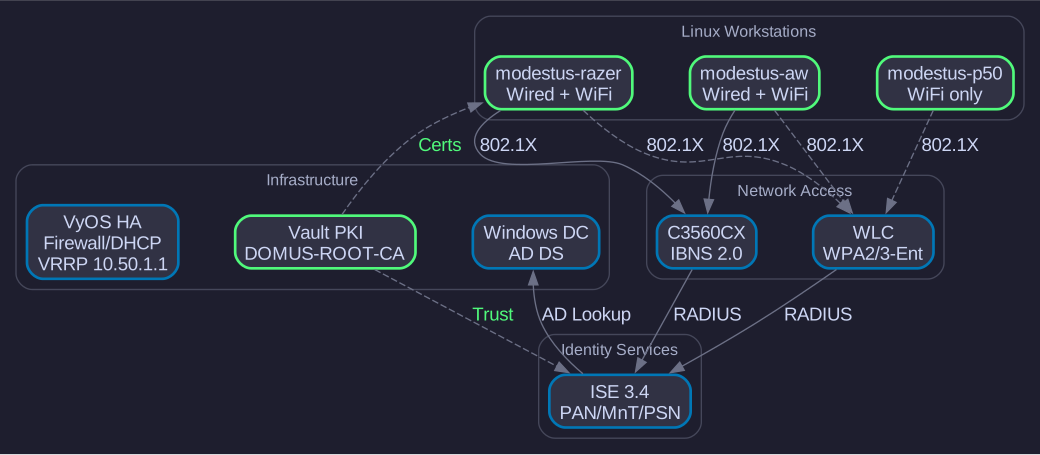
| Component | Hostname | IP Address |
|---|---|---|
Firewall/Router/DNS |
vyos.inside.domusdigitalis.dev |
10.50.1.90 |
Domain Controller |
home-dc01.inside.domusdigitalis.dev (AD DS, Windows Server 2025 Core) |
10.50.1.50 |
Vault PKI |
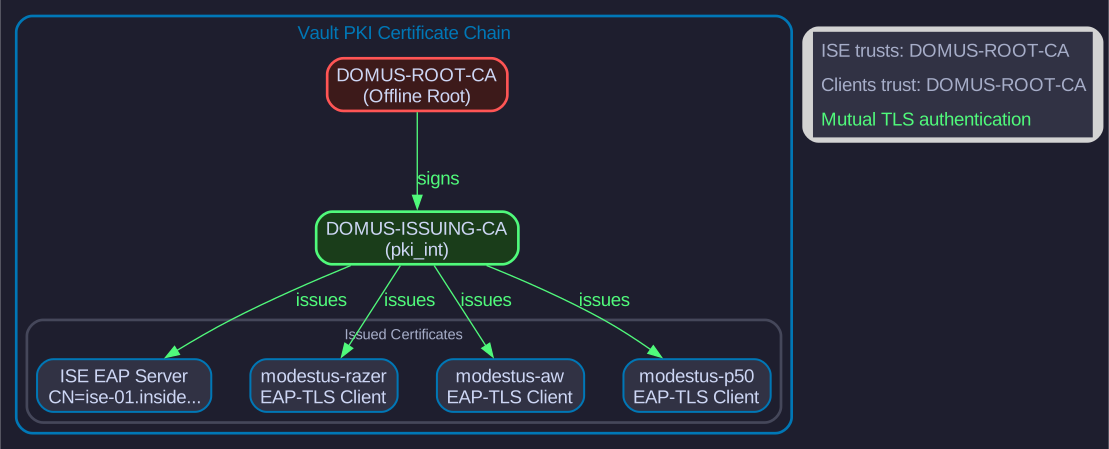
vault-01.inside.domusdigitalis.dev (DOMUS-ROOT-CA, DOMUS-ISSUING-CA) |
10.50.1.60 |
ISE Primary (ACTIVE) |
ise-01.inside.domusdigitalis.dev (ISE 3.4 - Primary PAN/MnT/PSN) |
10.50.1.20 |
ISE Deprecated |
ise-02.inside.domusdigitalis.dev (ISE 3.2p9 - pending decommission) |
10.50.1.21 |
Access Switch |
switch-01.inside.domusdigitalis.dev (C3PL IBNS2.0) |
10.50.1.10 |
WLC |
wlc.inside.domusdigitalis.dev (WPA2-Enterprise, WPA3) |
10.50.1.40 |
NAS |
nas-01.inside.domusdigitalis.dev |
10.50.1.70 |
3.1. VLAN Architecture
| VLAN | Name | Purpose |
|---|---|---|
100 |
100 |
Infrastructure devices only |
10 |
10 |
Authenticated users |
40 |
40 |
Linux workstations with EAP-TLS |
30 |
30 |
Guest portal with Internet-only access |
999 |
999 |
Authentication failure fallback |
3.2. Target Workstations
| Hostname | Model | Wired MAC | WiFi MAC | Owner |
|---|---|---|---|---|
modestus-razer |
Razer Blade 18 (RZ09-0529) |
98:BB:1E:1F:A7:13 |
TBD |
Evan |
modestus-p50 |
ThinkPad P50 (Lenovo) |
C8:5B:76:C6:59:62 |
14:F6:D8:7B:31:80 |
Gabriel |
modestus-aw |
Alienware x17 R2 (Dell) |
14:F6:D8:7B:31:80 |
TBD |
Evan |
modestus-p16g |
ThinkPad P16g Gen 3 (21V50016US) |
TBD — wired not yet configured |
WiFi EAP-TLS active |
Evan Rosado |
|
All workstations run Arch Linux with certificates issued from Vault PKI (DOMUS-ROOT-CA). |
4. Phase 1: System Validation
4.1. 1.1 System Information
hostnamectlExpected output:
 Static hostname: modestus-p50
       Icon name: computer-laptop
         Chassis: laptop
Operating System: Arch Linux
          Kernel: Linux 6.x.x-arch1-1
    Architecture: x86-64
4.2. 1.2 Network Connectivity
{
  echo "=== DNS Resolution ==="
  host {domain} {dns-primary} 2>/dev/null && echo "DNS: OK" || echo "DNS: FAIL"
  echo ""
  echo "=== DC Connectivity ==="
  timeout 3 bash -c '</dev/tcp/{ad-dc-ip}/389' 2>/dev/null && echo "LDAP ({ad-dc-ip}:389): OK" || echo "LDAP: FAIL"
  timeout 3 bash -c '</dev/tcp/{ad-dc-ip}/636' 2>/dev/null && echo "LDAPS ({ad-dc-ip}:636): OK" || echo "LDAPS: FAIL"
  timeout 3 bash -c '</dev/tcp/{ad-dc-ip}/88' 2>/dev/null && echo "Kerberos ({ad-dc-ip}:88): OK" || echo "Kerberos: FAIL"
  echo ""
  echo "=== ISE Connectivity ==="
  timeout 3 bash -c '</dev/tcp/{ise-02-ip}/8443' 2>/dev/null && echo "ISE Admin ({ise-02-ip}:8443): OK" || echo "ISE Admin: FAIL"
  echo ""
  echo "=== Internet ==="
  timeout 3 curl -sI https://google.com >/dev/null 2>&1 && echo "Internet: OK" || echo "Internet: FAIL"
} 2>&1
4.3. 1.3 AD Domain Join
{
  echo "=== Realm Status ==="
  realm list 2>/dev/null || echo "realm: not installed or not joined"
  echo ""
  echo "=== SSSD Service ==="
  systemctl is-active sssd 2>/dev/null && systemctl status sssd --no-pager -l | head -10 || echo "sssd: inactive or not installed"
  echo ""
  echo "=== Domain User Lookup ==="
  id $(whoami)@{domain} 2>&1 || echo "User lookup failed"
} 2>&1
Expected (compliant):
=== Realm Status ===
inside.domusdigitalis.dev
  type: kerberos
  realm-name: INSIDE.DOMUSDIGITALIS.DEV
  domain-name: inside.domusdigitalis.dev
  configured: kerberos-member
  server-software: active-directory
  client-software: sssd

=== SSSD Service ===
active
4.4. 1.4 Certificates
{
  HOSTNAME=$(hostname -s)
  echo "=== Root CA ==="
  ls -la {cert-dir}/{ca-cert} 2>/dev/null || echo "Root CA: NOT INSTALLED"
  echo ""
  echo "=== Machine Certificate ==="
  CERT="{cert-dir}/${HOSTNAME}-eaptls.pem"
  if [ -f "$CERT" ]; then
    echo "Certificate: $CERT"
    openssl x509 -in "$CERT" -noout -subject -issuer -dates 2>/dev/null
    echo ""
    echo "=== Extended Key Usage ==="
    openssl x509 -in "$CERT" -noout -text 2>/dev/null | grep -A2 "Extended Key Usage"
  else
    echo "Machine certificate: NOT INSTALLED"
  fi
  echo ""
  echo "=== Private Key ==="
  KEY="{key-dir}/${HOSTNAME}-eaptls.key"
  sudo test -f "$KEY" && echo "Private key: $KEY (exists, $(sudo stat -c %a $KEY) permissions)" || echo "Private key: NOT INSTALLED"
} 2>&1
4.5. 1.5 802.1X Configuration (wpa_supplicant)
{
  IFACE=$(ip -br link | grep -E "^en" | grep -v "docker\|veth" | awk '{print $1}' | head -1)
  echo "=== Wired Interface ==="
  echo "Interface: $IFACE"
  ip link show "$IFACE" 2>/dev/null | head -2
  echo ""
  echo "=== wpa_supplicant Config ==="
  [ -f /etc/wpa_supplicant/wpa_supplicant-wired.conf ] && {
    echo "Config exists"
    sudo grep -E "^network=|identity=|eap=|ca_cert=|client_cert=" /etc/wpa_supplicant/wpa_supplicant-wired.conf 2>/dev/null
  } || echo "wpa_supplicant-wired.conf: NOT CONFIGURED"
  echo ""
  echo "=== Service Status ==="
  systemctl is-active wpa_supplicant-wired@${IFACE} 2>/dev/null && {
    echo "Service: running"
    sudo wpa_cli -i "$IFACE" status 2>/dev/null | grep -E "wpa_state|EAP state|eap_tls"
  } || echo "wpa_supplicant service: not running"
} 2>&1
4.6. 1.6 Firewall (iptables/nftables)
{
  echo "=== Firewall Backend ==="
  command -v nft >/dev/null 2>&1 && echo "nftables: available" || echo "nftables: not installed"
  command -v iptables >/dev/null 2>&1 && echo "iptables: available" || echo "iptables: not installed"
  echo ""
  echo "=== iptables Rules ==="
  sudo iptables -L -n --line-numbers 2>/dev/null | head -25
} 2>&1|
Arch Linux uses iptables/nftables directly, not UFW. Host firewall is supplementary to ISE dACL enforcement. |
4.7. 1.7 Monitoring (Zabbix)
{
  echo "=== Zabbix Agent ==="
  systemctl is-active zabbix-agent2 2>/dev/null && {
    echo "Status: running"
    zabbix_agent2 -V 2>/dev/null | head -1
    echo ""
    echo "=== Server Configuration ==="
    grep -E "^Server=|^ServerActive=" /etc/zabbix/zabbix_agent2.conf 2>/dev/null
  } || echo "zabbix-agent2: not installed or inactive"
} 2>&1
5. Phase 1.5: ISE Pre-Deployment Validation
Before configuring the client, verify all ISE resources are in place.
5.1. Endpoint Groups
# Verify endpoint groups exist
netapi ise get-endpoint-groups | grep -i linux

# Expected:
# Linux-Workstations (parent)
# Linux-Research-Workstations (child)
5.2. Endpoint Registration
# Check if endpoint is pre-registered
netapi ise get-endpoint "{ws-p50-mac}"

# If not registered:
netapi ise create-endpoint "{ws-p50-mac}" \
  --description "{ws-p50-hostname} - {ws-p50-model}"
netapi ise update-endpoint-group "{ws-p50-mac}" "{endpoint-group-research}"
5.3. Authorization Profiles
# Verify authorization profiles
netapi ise get-authz-profile "{authz-profile-onboard}"
netapi ise get-authz-profile "{authz-profile-full}"
netapi ise get-authz-profile "{authz-profile-quarantine}"
5.4. dACLs
# Verify dACLs exist and contain expected ACEs
netapi ise get-dacl "{dacl-onboard}"
netapi ise get-dacl "{dacl-compliant}"
netapi ise get-dacl "{dacl-quarantine}"
5.5. Authorization Rules
# Verify rules in correct order
netapi ise get-authz-rules "{policy-set-wired}"

# Expected rule order:
# #0: EAP-TLS specific rule (most specific, matches first)
# #1: AD group-based rules (when ready)
# #2: Posture rules (when implemented)
# #N: Default Deny|
Rule order is critical. Most specific rules must be at rank 0. If a generic EAP-TLS rule is at rank 0, it will shadow all specific rules below it. See troubleshooting section for resolution. |
6. Phase 2: Certificate Enrollment (Vault PKI)
|
Certificates are now issued from Vault PKI (DOMUS-ROOT-CA), not AD CS. See Vault PKI Cert Issuance Runbook (infra-ops) for the complete 10-phase process. |
6.1. Quick Reference: Vault PKI Issuance
HOSTNAME=$(hostname -s)
DOMAIN="{domain}"

# Issue certificate from Vault
vault write pki_int/issue/{vault-pki-role} \
  common_name="${HOSTNAME}.${DOMAIN}" \
  ttl="8760h" \
  -format=json > /tmp/${HOSTNAME}-cert.json
6.2. Extract Certificate and Key
HOSTNAME=$(hostname -s)

# Extract certificate
jq -r '.data.certificate' /tmp/${HOSTNAME}-cert.json | sudo tee {cert-dir}/${HOSTNAME}-eaptls.pem > /dev/null

# Extract private key
jq -r '.data.private_key' /tmp/${HOSTNAME}-cert.json | sudo tee {key-dir}/${HOSTNAME}-eaptls.key > /dev/null

# Secure permissions
sudo chmod 644 {cert-dir}/${HOSTNAME}-eaptls.pem
sudo chmod 600 {key-dir}/${HOSTNAME}-eaptls.key
sudo chown root:root {key-dir}/${HOSTNAME}-eaptls.key
6.3. Verify Certificate
HOSTNAME=$(hostname -s)

# Verify chain against Vault CA
openssl verify -CAfile {cert-dir}/{ca-cert} {cert-dir}/${HOSTNAME}-eaptls.pem

# Check subject and issuer
openssl x509 -in {cert-dir}/${HOSTNAME}-eaptls.pem -noout -subject -issuer

# Expected:
# subject=CN = modestus-razer.inside.domusdigitalis.dev
# issuer=CN = DOMUS-ISSUING-CA
6.4. Verify Certificate-Key Match
HOSTNAME=$(hostname -s)

# Method 1: Modulus comparison (RSA)
openssl x509 -in {cert-dir}/${HOSTNAME}-eaptls.pem -noout -modulus | md5sum
sudo openssl rsa -in {key-dir}/${HOSTNAME}-eaptls.key -noout -modulus | md5sum
# Both hashes MUST be identical

# Method 2: Public key SHA256 (works with all key types)
openssl x509 -in {cert-dir}/${HOSTNAME}-eaptls.pem -pubkey -noout | openssl sha256
sudo openssl pkey -in {key-dir}/${HOSTNAME}-eaptls.key -pubout | openssl sha256
# Both hashes MUST be identical7. Phase 3: wpa_supplicant Configuration
7.1. Step 1: Create Config
HOSTNAME=$(hostname -s)

sudo tee /etc/wpa_supplicant/wpa_supplicant-wired.conf << EOF
ctrl_interface=/run/wpa_supplicant
ctrl_interface_group=wheel
eapol_version=2
ap_scan=0
fast_reauth=1

network={
    key_mgmt=IEEE8021X
    eap=TLS
    identity="${HOSTNAME}.{domain}"
    ca_cert="{cert-dir}/{ca-cert}"
    client_cert="{cert-dir}/${HOSTNAME}-eaptls.pem"
    private_key="{key-dir}/${HOSTNAME}-eaptls.key"
    eapol_flags=0
}
EOF

sudo chmod 600 /etc/wpa_supplicant/wpa_supplicant-wired.conf
7.2. Step 2: Manual Test
|
Test manually first while you still have WiFi connectivity! |
# Get your wired interface name
IFACE=$(ip -br link | grep -E "^en" | grep -v "docker\|veth" | awk '{print $1}' | head -1)
echo "Wired interface: $IFACE"

# Plug in ethernet cable first!

# Run wpa_supplicant in foreground (Ctrl+C to stop)
sudo wpa_supplicant -i $IFACE \
  -c /etc/wpa_supplicant/wpa_supplicant-wired.conf \
  -D wired

# Watch for:
# - "CTRL-EVENT-EAP-STARTED"
# - "CTRL-EVENT-EAP-SUCCESS"
# - "CTRL-EVENT-CONNECTED"
7.3. Step 3: Enable Systemd Service
IFACE=$(ip -br link | grep -E "^en" | grep -v "docker\|veth" | awk '{print $1}' | head -1)

# Enable and start service
sudo systemctl enable wpa_supplicant-wired@${IFACE}.service
sudo systemctl start wpa_supplicant-wired@${IFACE}.service

# Check status
sudo systemctl status wpa_supplicant-wired@${IFACE}
sudo wpa_cli -i $IFACE status
8. Phase 4: ISE Session Verification & Policy Transition
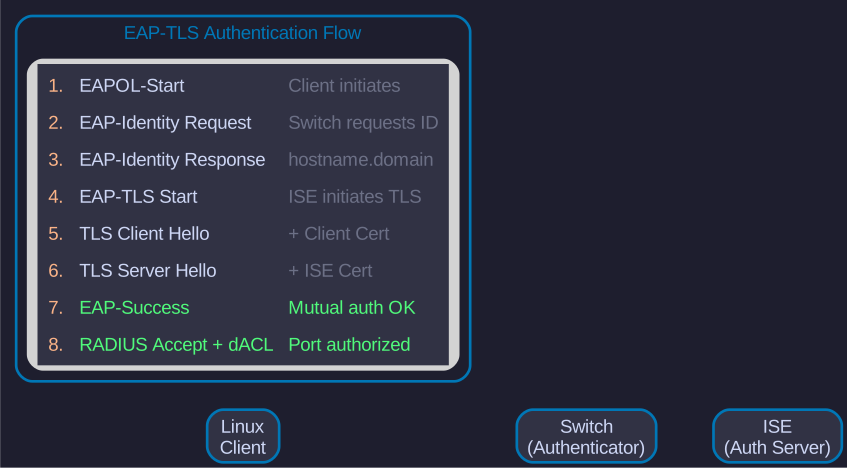
After wpa_supplicant authenticates, verify the ISE session and transition from onboarding to hardened policy.
8.1. 4.1 Verify ISE Session
# Check active session via MnT
netapi ise mnt session "{ws-p50-mac}"

# Expected output should show:
# - NAS IP: {switch-ip}
# - Authentication method: dot1x
# - EAP method: EAP-TLS
# - Authorization profile: {authz-profile-onboard}
8.2. 4.2 Verify Switch-Side Authorization
# Check session on switch
netapi ios exec "show access-session interface GigabitEthernet1/0/2 detail"

# Expected:
#   Status: Authorized
#   dot1x: Authc Success
#   ACS ACL: <dACL name>
8.3. 4.3 Transition to Hardened Policy
Once the onboarding session is verified, transition to the production-hardened policy:
# Verify current authorization rule applied
netapi ise dc session "{ws-p50-mac}"

# If showing onboard profile, update endpoint group to trigger production rule
# (ISE rule should match endpoint group + EAP-TLS for production profile)

# Issue Change of Authorization to apply new policy
netapi ise mnt coa-reauthenticate "{ws-p50-mac}"

# Verify new profile applied
netapi ise mnt session "{ws-p50-mac}"
# Expected: Authorization profile = {authz-profile-full}9. Phase 5: Zero-Trust Validation
9.1. 5.1 Zero-Trust Test Script
{
  echo "=== Testing PERMITTED traffic ==="
  echo ""

  echo "Test 1: Internet ICMP (8.8.8.8)"
  timeout 3 ping -c 2 8.8.8.8 >/dev/null 2>&1 && echo "[PASS] Internet ICMP" || echo "[FAIL] Internet ICMP"

  echo "Test 2: DNS to pfSense ({dns-primary})"
  timeout 3 dig google.com @{dns-primary} +short >/dev/null 2>&1 && echo "[PASS] DNS pfSense" || echo "[FAIL] DNS pfSense"

  echo "Test 3: DNS to DC ({ad-dc-ip})"
  timeout 3 dig google.com @{ad-dc-ip} +short >/dev/null 2>&1 && echo "[PASS] DNS DC" || echo "[FAIL] DNS DC"

  echo "Test 4: HTTPS to internet"
  timeout 3 curl -sI https://google.com >/dev/null 2>&1 && echo "[PASS] HTTPS" || echo "[FAIL] HTTPS"

  echo "Test 5: Kerberos to DC ({ad-dc-ip}:88)"
  timeout 3 bash -c '</dev/tcp/{ad-dc-ip}/88' 2>/dev/null && echo "[PASS] Kerberos" || echo "[FAIL] Kerberos"

  echo "Test 6: LDAP to DC ({ad-dc-ip}:389)"
  timeout 3 bash -c '</dev/tcp/{ad-dc-ip}/389' 2>/dev/null && echo "[PASS] LDAP" || echo "[FAIL] LDAP"

  echo "Test 7: SMB to DC ({ad-dc-ip}:445)"
  timeout 3 bash -c '</dev/tcp/{ad-dc-ip}/445' 2>/dev/null && echo "[PASS] SMB" || echo "[FAIL] SMB"

  echo ""
  echo "=== Testing BLOCKED traffic (should timeout) ==="
  echo ""

  echo "Test 8: Ping to pfSense ({dns-primary}) - should FAIL"
  timeout 3 ping -c 2 {dns-primary} >/dev/null 2>&1 && echo "[SECURITY ISSUE] Internal ICMP allowed!" || echo "[PASS] Internal ICMP blocked"

  echo "Test 9: SSH to switch ({switch-ip}:22) - should FAIL"
  timeout 3 bash -c '</dev/tcp/{switch-ip}/22' 2>/dev/null && echo "[SECURITY ISSUE] Lateral movement!" || echo "[PASS] Switch SSH blocked"

  echo "Test 10: SSH to NAS ({nas-ip}:22) - should FAIL"
  timeout 3 bash -c '</dev/tcp/{nas-ip}/22' 2>/dev/null && echo "[SECURITY ISSUE] NAS access!" || echo "[PASS] NAS SSH blocked"

  echo ""
  echo "=== Summary ==="
  echo "Tests 1-7: Required services - should PASS"
  echo "Tests 8-10: Lateral movement - should be BLOCKED"
} 2>&1|
If any "should FAIL" tests pass, your zero-trust dACL is BROKEN! This indicates lateral movement is possible — the workstation can reach internal systems it should not. |
10. Phase 6: netapi Automation
10.1. 6.1 Environment Setup
# Load credentials from dsec
dsource d000 dev/network

# Or set manually
export ISE_HOST={ise-02-ip}
export ISE_USERNAME=<ers-admin>
export ISE_PASSWORD=<password>
10.2. 6.2 Session Monitoring
# Check active session
netapi ise mnt session {ws-p50-mac}

# Check authentication history
netapi ise mnt auth-status {ws-p50-mac}

# Force reauthentication (CoA)
netapi ise mnt coa-disconnect {ws-p50-mac}
10.3. 6.3 Policy Validation
# List policy sets
netapi ise get-policy-sets

# Check authorization rules
netapi ise get-authz-rules "{policy-set-wired}"

# Check authorization profile
netapi ise get-authz-profile "{authz-profile-full}"

# Check dACL content
netapi ise get-dacl "{dacl-compliant}"
10.4. 6.4 Switch Session Verification
# Check session on switch
netapi ios exec "show access-session interface GigabitEthernet1/0/2 detail"

# Check applied ACL
netapi ios exec "show ip access-list" | grep -A20 "Linux"
10.5. 6.5 Quick Reference Commands
| Command | Purpose |
|---|---|
|
Active session status |
|
Detailed diagnostics (which rule matched, profile applied) |
|
Authentication history |
|
Force reauthentication with new policy |
|
Disconnect endpoint (full re-auth required) |
|
List authorization rules in order |
|
View dACL ACE entries |
|
All active sessions on switch |
11. Appendix A: Rollback Procedure
If 802.1X fails and you lose network:
# Stop wpa_supplicant
IFACE=$(ip -br link | grep -E "^en" | grep -v "docker\|veth" | awk '{print $1}' | head -1)
sudo systemctl stop wpa_supplicant-wired@${IFACE}
sudo systemctl disable wpa_supplicant-wired@${IFACE}

# Kill any manual instances
sudo pkill wpa_supplicant

# Network should fall back to MAB or open mode
# (depends on switch configuration)
12. Appendix B: Troubleshooting
12.1. Authentication Fails
# Check wpa_supplicant logs
sudo journalctl -u wpa_supplicant-wired@<interface> --since "10 minutes ago"

# Check ISE live logs
netapi ise mnt auth-status <mac-address>

# Verify certificate chain
openssl verify -CAfile {cert-dir}/{ca-cert} {cert-dir}/<hostname>-eaptls.pem
12.2. ISE Session Diagnostics
# Which authorization rule matched?
netapi ise dc session <mac-address>

# Expected fields to check:
# - AuthorizationPolicyMatchedRule
# - SelectedAuthorizationProfiles
# - NASIPAddress
# - RadiusFlowType
12.3. Wrong VLAN Assignment
Symptoms: Authentication succeeds but endpoint is on wrong VLAN.
Diagnosis:
# Check which profile was applied
netapi ise dc session <MAC>

# Review authorization rule order
netapi ise get-authz-rules "{policy-set-wired}"
Root Cause: Authorization rule ordering. Most specific rules must be at rank 0 (top of list).
Resolution:
# Remove shadowing rules
netapi ise delete-authz-rule "{policy-set-wired}" "<generic-rule>" --force

# Verify rule order
netapi ise get-authz-rules "{policy-set-wired}"

# Reconnect to apply
sudo wpa_cli -i <interface> reassociate
12.4. dACL Not Applying
Symptoms: Session authorized but no ACL on switch port.
Diagnosis:
# Check switch for applied ACL
netapi ios exec "show access-session interface <interface> detail"

# Check ISE authorization profile has dACL configured
netapi ise get-authz-profile "{authz-profile-full}"
Common Cause: Authorization profile missing dACL reference or dACL name typo.
12.5. Certificate Chain Validation Failure
Symptoms: TLS Alert: unknown CA or certificate verify failed
Diagnosis:
# Compare ISE server cert issuer with client trust store
echo | openssl s_client -connect {ise-02-ip}:8443 -showcerts 2>/dev/null | grep -E "subject|issuer"

# Verify client trust store has correct CA
openssl x509 -in {cert-dir}/{ca-cert} -noout -subject -issuer
Resolution: Update ca_cert path in wpa_supplicant config to match the CA that signed the ISE EAP certificate.
12.6. Common Issues
| Issue | Resolution |
|---|---|
|
Root CA not installed or wrong CA in wpa_supplicant config |
|
Certificate expired, wrong EKU, or CN mismatch |
|
Check ISE live logs for specific failure reason |
Session shows wrong VLAN |
Check ISE authorization rule ordering (most specific first) |
dACL not applied |
Verify authorization profile has dACL configured |
Modulus mismatch (cert vs key) |
Certificate and private key are from different CSR requests |
|
Set |
12.7. ISE Error Code Reference
| Code | Meaning | Action |
|---|---|---|
12514 |
EAP-TLS handshake failed |
Check client certificate, CA trust, and cert chain |
12321 |
RADIUS packet dropped |
Verify RADIUS shared secret between switch and ISE |
22056 |
Subject not found in identity store |
Endpoint not registered in ISE, create with |
22045 |
RADIUS request dropped — no matched policy set |
Verify policy set conditions match (e.g., wired dot1x) |
22059 |
Authorization failed |
Check authorization rule conditions and ordering |
13. Quick Reference
Daily Operations Commands (click to expand)
# Check 802.1X status
nmcli connection show --active | grep 802.1X

# Verify certificate validity
openssl x509 -in /etc/ssl/certs/$(hostname)-eaptls.pem -subject -issuer -dates -noout

# Test ISE connectivity
netapi ise mnt sessions

# Check RADIUS authentication logs
journalctl -u NetworkManager | grep -i "802.1x\|eap" | tail -20

# Verify endpoint in ISE
netapi ise get-endpoint-by-mac <mac-address>

# Force reauthentication
nmcli connection down Wired-802.1X && nmcli connection up Wired-802.1X
Troubleshooting Commands (click to expand)
# Check certificate chain
openssl verify -CAfile /etc/ssl/certs/domus-ca-chain.crt /etc/ssl/certs/$(hostname)-eaptls.pem

# View certificate details
openssl x509 -in /etc/ssl/certs/$(hostname)-eaptls.pem -text -noout

# Check wpa_supplicant logs
journalctl -u wpa_supplicant -f

# Test RADIUS from switch perspective
netapi ise dc query "SELECT * FROM RADIUS_AUTHENTICATIONS WHERE CALLING_STATION_ID LIKE '%<mac>%' ORDER BY TIMESTAMP_TIMEZONE DESC FETCH FIRST 5 ROWS ONLY"

# Verify Kerberos ticket
klist -e
14. Document Revision History
| Version | Date | Changes |
|---|---|---|
1.0 |
2026-02-02 |
Initial runbook creation from Antora documentation |
1.1 |
2026-02-02 |
Fix stale IPs: switch=10.50.1.10, ad-dc=10.50.1.50, ISE roles |
2.0 |
2026-02-03 |
ISE policy attributes, deployment status, Phase 1.5 (ISE pre-deployment validation), Phase 4 (session verification), expanded troubleshooting |
3.0 |
2026-02-11 |
ISE 3.4 migration complete (ise-01 now PRIMARY), Vault PKI replaces AD CS, added modestus-aw workstation |
3.1 |
2026-02-11 |
Premium styling: Executive summary, CSS status badges, Priority column, enterprise validation table |
Environment: Domus Digitalis Home Enterprise
Author: Evan
Last Updated: 2026-02-11