Linux AD Authentication Deployment - Xianming Ding Request
1. Executive Summary
|
This runbook was validated in the Domus Digitalis home enterprise before CHLA production deployment. Pattern validation reference: ise-linux component, |
2. Device Information
| Field | Value |
|---|---|
Request ID |
XIANMING-LINUX-2026-02 |
Owner |
Dr. Xianming Ding |
Department |
Research Computing |
Location |
TBD |
MAC Address |
|
Switch |
|
Port |
|
Current Policy |
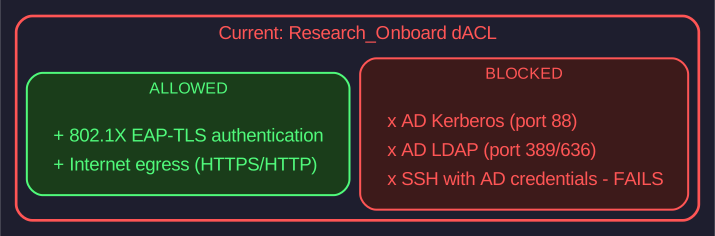
Research_Onboard (AD SSH blocked) |
Target Policy |
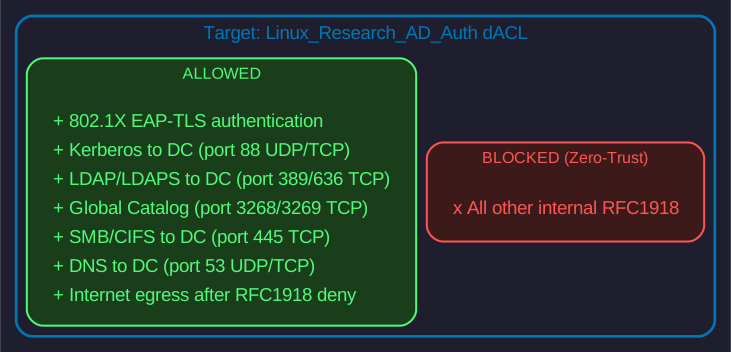
Linux_Research_AD_Auth (hardened) |
3. Architecture Context
3.1. The Problem
3.2. The Solution
3.3. Required AD Ports
| Port | Protocol | Purpose |
|---|---|---|
53 |
UDP/TCP |
DNS to Domain Controller |
88 |
UDP/TCP |
Kerberos authentication |
389 |
TCP |
LDAP (directory services) |
636 |
TCP |
LDAPS (TLS-encrypted LDAP) |
445 |
TCP |
SMB/CIFS (AD group policy, file shares) |
3268 |
TCP |
Global Catalog |
3269 |
TCP |
Global Catalog (TLS) |
4. Prerequisites
4.1. CHLA Infrastructure Details (FILL BEFORE DEPLOYMENT)
| Component | Value |
|---|---|
Primary DC |
|
Secondary DC |
|
AD Domain |
|
Kerberos Realm |
|
DNS Servers |
|
ISE PSN |
|
Policy Set |
|
4.2. Pattern Validation (Home Enterprise)
The following was validated in home enterprise on 2026-02-12:
| Test | Result | Notes |
|---|---|---|
dACL creation via netapi |
PASS |
|
Authorization profile with dACL |
PASS |
VLAN + dACL assignment |
Authorization rule at rank 0 |
PASS |
Most specific rule first |
CoA reauthentication |
PASS |
New dACL applies within 10s |
Kerberos kinit under dACL |
PASS |
Tickets acquired successfully |
SSH with AD credentials |
PASS |
Domain user login works |
Lateral movement blocked |
PASS |
RFC1918 ping fails |
5. Phase 0: 802.1X Supplicant Configuration (NetworkManager)
|
This section addresses the "password required" issue where NetworkManager prompts for a private key password even when the key has no passphrase. This was field-tested in the home enterprise and is critical for unattended 802.1X authentication. |
5.1. The Problem
When applying NetworkManager 802.1X configuration, the supplicant may prompt:
Error: Connection activation failed: Secrets were required, but not providedOr in GUI:
"Authentication required for Wired-802.1X"
"Private key password needed"
Root Cause: NetworkManager defaults to treating the private key as password-protected. Without explicit flags, it waits for user input.
5.2. The Solution: Password Flags
Two critical flags MUST be set:
| Flag | Purpose |
|---|---|
|
Store identity in connection file (not as secret requiring prompt) |
|
Key has no password - don’t prompt (value 4 = NOT_REQUIRED) |
5.3. 0.1 Create 802.1X Connection (Correct Method)
# Get hostname
MYHOST=$(hostname -s)
INTERFACE="eth0"  # Replace with actual interface name
DOMAIN="la.ad.chla.org"
CA_CERT="/etc/ssl/certs/CHLA-CHAIN.pem"
CLIENT_CERT="/etc/ssl/certs/${MYHOST}-eaptls.pem"
PRIVATE_KEY="/etc/ssl/private/${MYHOST}-eaptls.key"

# Create connection WITH password flags
sudo nmcli connection add \
  type ethernet \
  con-name "Wired-802.1X" \
  ifname "$INTERFACE" \
  802-1x.eap tls \
  802-1x.identity "${MYHOST}.${DOMAIN}" \
  802-1x.identity-flags 0 \
  802-1x.ca-cert "$CA_CERT" \
  802-1x.client-cert "$CLIENT_CERT" \
  802-1x.private-key "$PRIVATE_KEY" \
  802-1x.private-key-password-flags 4 \
  connection.autoconnect yes
5.4. 0.2 Verify Connection File
# Check the connection file has correct flags
sudo grep -E "identity-flags|private-key-password-flags" \
/etc/NetworkManager/system-connections/Wired-802.1X.nmconnectionidentity-flags=0
private-key-password-flags=45.5. 0.3 Fix Existing Connection (If Already Created)
If connection was created without flags, edit the file directly:
# Edit connection file
sudo nvim /etc/NetworkManager/system-connections/Wired-802.1X.nmconnection

# In [802-1x] section, add/modify:
# identity-flags=0
# private-key-password-flags=4

# Reload and reconnect
sudo nmcli connection reload
sudo nmcli connection up "Wired-802.1X"
5.6. 0.4 Expected [802-1x] Section
[802-1x]
ca-cert=/etc/ssl/certs/CHLA-CHAIN.pem
client-cert=/etc/ssl/certs/hostname-eaptls.pem
eap=tls;
identity=hostname.la.ad.chla.org
identity-flags=0
private-key=/etc/ssl/private/hostname-eaptls.key
private-key-password-flags=4
5.7. 0.5 Certificate Chain Note
If 802.1X authentication fails with "TLS handshake failed" or "unknown CA", the CA cert may need to be a chain file:
# Create combined chain (ROOT CA first, then SUB CA)
cat /usr/local/share/ca-certificates/CHLAROOTCA.crt \
    /usr/local/share/ca-certificates/CHLASUBCA.crt \
    > /tmp/chla-chain.pem

sudo cp /tmp/chla-chain.pem /etc/ssl/certs/CHLA-CHAIN.pem
sudo chmod 644 /etc/ssl/certs/CHLA-CHAIN.pem

# Update connection
sudo nmcli connection modify "Wired-802.1X" \
  802-1x.ca-cert /etc/ssl/certs/CHLA-CHAIN.pem
6. Phase 1: Pre-Deployment Validation
6.1. 1.1 SSH to Target Workstation
# Fill in actual IP when known
ssh <admin-user>@<TARGET-IP>
6.2. 1.2 System Information
echo "=== HOSTNAME ==="
hostname -f

echo "=== OS VERSION ==="
cat /etc/os-release | head -5

echo "=== NETWORK INTERFACE ==="
ip link show | grep -E "^[0-9]|ether"
6.3. 1.3 AD Domain Join Status
echo "=== REALM LIST ==="
realm list

echo "=== SSSD STATUS ==="
systemctl status sssd --no-pager

echo "=== TEST USER RESOLUTION ==="
id <user>@la.ad.chla.org 2>/dev/null || echo "User not found"
getent passwd <user>@la.ad.chla.org 2>/dev/null || echo "NSS lookup failed"
Expected: realm list shows la.ad.chla.org configured, sssd running
6.4. 1.4 AD Connectivity (BEFORE dACL change)
DC_IP="<DC-IP-1>"

echo "=== AD Connectivity Test ==="
{
  echo -n "DNS (53)....... "; timeout 3 bash -c "</dev/tcp/$DC_IP/53" 2>/dev/null && echo "OK" || echo "FAIL"
  echo -n "Kerberos (88).. "; timeout 3 bash -c "</dev/tcp/$DC_IP/88" 2>/dev/null && echo "OK" || echo "FAIL"
  echo -n "LDAP (389)..... "; timeout 3 bash -c "</dev/tcp/$DC_IP/389" 2>/dev/null && echo "OK" || echo "FAIL"
  echo -n "LDAPS (636).... "; timeout 3 bash -c "</dev/tcp/$DC_IP/636" 2>/dev/null && echo "OK" || echo "FAIL"
  echo -n "SMB (445)...... "; timeout 3 bash -c "</dev/tcp/$DC_IP/445" 2>/dev/null && echo "OK" || echo "FAIL"
} 2>&1
Interpreting Results:
-
If all FAIL → current dACL is blocking AD traffic (expected with Research_Onboard)
-
If all OK from admin workstation, FAIL from endpoint → confirms dACL issue
6.5. 1.5 Current ISE Session
From admin workstation with netapi:
# Load credentials
dsource chla network/ise

# Check current session
netapi ise mnt session "<MAC-ADDRESS>"
7. Phase 2: ISE Policy Creation
7.1. 2.1 Create dACL Content File
cat << 'EOF' > /tmp/dacl-linux-ad-auth-chla.txt
remark Section 1: DHCP (network bootstrap)
permit udp any any eq 67
permit udp any any eq 68

remark Section 2: DNS to Domain Controllers
permit udp any host <DC-IP-1> eq 53
permit tcp any host <DC-IP-1> eq 53
permit udp any host <DC-IP-2> eq 53
permit tcp any host <DC-IP-2> eq 53

remark Section 3: Kerberos (authentication)
permit udp any host <DC-IP-1> eq 88
permit tcp any host <DC-IP-1> eq 88
permit udp any host <DC-IP-2> eq 88
permit tcp any host <DC-IP-2> eq 88

remark Section 4: LDAP/LDAPS (directory services)
permit tcp any host <DC-IP-1> eq 389
permit tcp any host <DC-IP-1> eq 636
permit tcp any host <DC-IP-2> eq 389
permit tcp any host <DC-IP-2> eq 636

remark Section 5: Global Catalog (AD cross-domain)
permit tcp any host <DC-IP-1> eq 3268
permit tcp any host <DC-IP-1> eq 3269
permit tcp any host <DC-IP-2> eq 3268
permit tcp any host <DC-IP-2> eq 3269

remark Section 6: SMB/CIFS (AD group policy)
permit tcp any host <DC-IP-1> eq 445
permit tcp any host <DC-IP-2> eq 445

remark Section 7: kpasswd (password changes)
permit tcp any host <DC-IP-1> eq 464
permit udp any host <DC-IP-1> eq 464
permit tcp any host <DC-IP-2> eq 464
permit udp any host <DC-IP-2> eq 464

remark Section 8: NTP (time sync - critical for Kerberos)
permit udp any any eq 123

remark Section 9: ICMP (diagnostics)
permit icmp any any

remark Section 10: DENY ALL RFC1918 (zero-trust)
deny ip any 10.0.0.0 0.255.255.255
deny ip any 172.16.0.0 0.15.255.255
deny ip any 192.168.0.0 0.0.255.255

remark Section 11: Internet egress
permit ip any any
EOF

echo "Created /tmp/dacl-linux-ad-auth-chla.txt"|
Replace |
7.2. 2.2 Create dACL in ISE
DACL_NAME="DACL_LINUX_RESEARCH_AD_AUTH"

netapi ise create-dacl "$DACL_NAME" \
  --file /tmp/dacl-linux-ad-auth-chla.txt \
  --descr "Linux 802.1X with AD-authenticated SSH - Xianming request"
7.3. 2.3 Verify dACL
netapi ise get-dacl "$DACL_NAME"7.4. 2.4 Create Authorization Profile
AUTHZ_PROFILE="Linux_Research_AD_Auth"

netapi ise create-authz-profile "$AUTHZ_PROFILE" \
  --dacl "$DACL_NAME" \
  --descr "Linux EAP-TLS with AD SSH access - Xianming request"
7.5. 2.5 Verify Authorization Profile
netapi ise get-authz-profile "$AUTHZ_PROFILE"7.6. 2.6 Add Authorization Rule
POLICY_SET="Wired Dot1X Closed"

# Dry run first
netapi ise add-authz-rule "$POLICY_SET" \
  "$AUTHZ_PROFILE" \
  "$AUTHZ_PROFILE" \
  --rank 0 \
  --dry-run
# Apply the rule
netapi ise add-authz-rule "$POLICY_SET" \
"$AUTHZ_PROFILE" \
"$AUTHZ_PROFILE" \
--rank 08. Phase 3: Apply Policy and Reauthenticate
8.1. 3.1 Issue CoA
MAC="<MAC-ADDRESS>"

netapi ise mnt coa "$MAC"

echo "Waiting 15 seconds for reauthentication..."
sleep 15
8.2. 3.2 Verify New Session
netapi ise mnt session "$MAC"Expected: Authorization profile = Linux_Research_AD_Auth
9. Phase 4: Endpoint Validation
9.1. 4.1 AD Connectivity (AFTER dACL change)
From the target workstation:
DC_IP="<DC-IP-1>"

echo "=== AD Connectivity Post-dACL ==="
{
  echo -n "DNS (53)....... "; timeout 3 bash -c "</dev/tcp/$DC_IP/53" 2>/dev/null && echo "OK" || echo "FAIL"
  echo -n "Kerberos (88).. "; timeout 3 bash -c "</dev/tcp/$DC_IP/88" 2>/dev/null && echo "OK" || echo "FAIL"
  echo -n "LDAP (389)..... "; timeout 3 bash -c "</dev/tcp/$DC_IP/389" 2>/dev/null && echo "OK" || echo "FAIL"
  echo -n "SMB (445)...... "; timeout 3 bash -c "</dev/tcp/$DC_IP/445" 2>/dev/null && echo "OK" || echo "FAIL"
} 2>&1
Expected: All should now show OK
9.2. 4.2 Kerberos Ticket Acquisition
# Get Kerberos ticket
kinit <user>@LA.AD.CHLA.ORG

# Verify ticket
klist
9.3. 4.3 SSH with AD Account
From another machine, SSH to the target with AD credentials:
ssh <user>@la.ad.chla.org@<TARGET-IP> whoamiExpected: Login successful, returns domain username
9.4. 4.4 Lateral Movement Block Test
echo "=== Lateral Movement Test (should FAIL) ==="

# These should timeout/fail
ping -c 2 10.112.142.1  # Internal server
ping -c 2 10.134.144.1  # Another internal server

echo "If pings succeeded, dACL is NOT working correctly!"
9.5. 4.5 Internet Egress Test
echo "=== Internet Egress (should SUCCEED) ==="
curl -s -o /dev/null -w "HTTP %{http_code}\n" https://www.google.com
Expected: HTTP 200 or 301
10. Test Results Matrix
| Test | Expected | Actual | Status |
|---|---|---|---|
AD connectivity pre-dACL (port 88) |
FAIL (blocked by Research_Onboard) |
||
AD connectivity post-dACL (port 88) |
OK |
||
Kerberos kinit |
Ticket acquired |
||
SSH with AD account |
Login successful |
||
klist shows valid ticket |
Ticket displayed |
||
Lateral movement (ping 10.x.x.x) |
BLOCKED |
||
Internet egress (curl google.com) |
HTTP 200 |
||
ISE session shows correct profile |
Linux_Research_AD_Auth |
11. Rollback
11.1. Quick Rollback (Revert to Research_Onboard)
# Delete the authorization rule
netapi ise delete-authz-rule "$POLICY_SET" "$AUTHZ_PROFILE" --force

# Force reauthentication (will fall back to default rule)
netapi ise mnt coa "$MAC"
11.2. Full Rollback (Delete All Objects)
# 1. Delete authorization rule
netapi ise delete-authz-rule "$POLICY_SET" "$AUTHZ_PROFILE" --force

# 2. Delete authorization profile
netapi ise delete-authz-profile "$AUTHZ_PROFILE" --force

# 3. Delete dACL
netapi ise delete-dacl "$DACL_NAME" --force

# 4. Force reauthentication
netapi ise mnt coa "$MAC"
12. Deliverables
12.1. For Xianming Ding
-
Workstation MAC address
-
Workstation location (switch/port)
-
Confirmation workstation is domain-joined
-
Verification SSH works with AD credentials post-deployment
12.2. For InfoSec Team
-
dACL created:
DACL_LINUX_RESEARCH_AD_AUTH -
Authorization profile created:
Linux_Research_AD_Auth -
Authorization rule added to policy set
-
CoA issued and new policy applied
-
All validation tests pass
12.3. Status Update Template
Subject: Linux AD Auth Deployment - Xianming Ding Request

Deployment Date: 2026-02-14
Device: <MAC-ADDRESS> on <SWITCH> <INTERFACE>

Validation Results:
- AD Connectivity (pre): BLOCKED (as expected)
- AD Connectivity (post): [PASS/FAIL]
- Kerberos kinit: [PASS/FAIL]
- SSH with AD: [PASS/FAIL]
- Lateral movement: [BLOCKED/FAIL]
- Internet: [PASS/FAIL]

ISE Objects:
- dACL: DACL_LINUX_RESEARCH_AD_AUTH (created)
- Authz Profile: Linux_Research_AD_Auth (created)
- Authz Rule: Rank 0 in Wired Dot1X Closed

Status: [COMPLETE/PENDING/BLOCKED]

Notes:
<Any issues or observations>
13. Quick Reference Commands
13.1. netapi Commands
| Command | Purpose |
|---|---|
|
Active session status |
|
Detailed diagnostics |
|
Force reauthentication |
|
View dACL content |
|
List authorization rules |
13.2. Switch Commands
show access-session mac <MAC> detail
show ip access-list | include DACL_LINUX
clear access-session mac <MAC>
14. References
-
Pattern validation: ise-linux component,
linux-ad-auth-daclrunbook -
Deployment template: ise-linux component,
linux-eaptls-deployment-runbook -
Previous deployment: captures,
DEPLOY-2026-01-26-shahab-linux-workstation
Prepared: 2026-02-14
Request: Xianming Ding - Linux AD Authentication
Validated: Domus Digitalis home enterprise (2026-02-12)