Command Reference - February 2026
Reusable command reference for infrastructure automation. Include in other documents using include::REF-2026-02-command-reference.adoc[tag=section-name].
1. Text Processing
1.1. sed - Stream Editor
1.1.1. Pattern Replacement
- Preview changes (non-destructive)
sed -n 's/old/new/gp' file- Diff-style preview
sed 's/old/new/g' file | diff file -- Replace in-place
sed -i 's/old/new/g' file- Replace in multiple files
sed -i 's/old/new/g' *.py1.1.2. Line Operations
- View lines 10-20
sed -n '10,20p' file.txt- View line 50 only
sed -n '50p' file.txt- Delete line 10
sed -i '10d' file.txt- Delete lines 10-20
sed -i '10,20d' file.txt- Delete from line 50 to end
sed -i '50,$d' file.txt- Insert line after line 10
sed -i '10a New line after 10' file.txt- Insert line before line 10
sed -i '10i New line before 10' file.txt1.1.3. vim/sed Comparison
- Replace all in file
-
-
vim:
:%s/old/new/g -
sed:
sed -i 's/old/new/g' file
-
- Replace in line range
-
-
vim:
:10,20s/old/new/g -
sed:
sed -i '10,20s/old/new/g' file
-
1.2. grep - Pattern Search
- Basic search
grep "pattern" file.txt- Recursive search
grep -r "pattern" directory/- Show 5 lines after match
grep -A 5 "pattern" file.txt- Show 5 lines before match
grep -B 5 "pattern" file.txt- Show 5 lines around match
grep -C 5 "pattern" file.txt- With line numbers
grep -n "pattern" file.txt- List matching files only
grep -l "pattern" *.adoc- Invert match (exclude pattern)
grep -v "exclude" file.txt- Count matches
grep -c "pattern" file.txt1.3. awk - Field Processing
- Print specific columns
awk '{print $1, $3}' file.txt- Use custom delimiter
awk -F':' '{print $1}' /etc/passwd- Filter by pattern
awk '/error/ {print $0}' logfile- Sum a column
awk '{sum += $2} END {print sum}' numbers.txt- Format output with printf
awk '{printf "%-20s %s\n", $1, $2}' file.txt2. SSH & Remote Access
2.1. SSH Key Management
2.1.1. Key Generation
- Generate Ed25519 key (recommended)
ssh-keygen -t ed25519 -C "purpose@host" -f ~/.ssh/id_ed25519_purpose- Generate YubiKey-backed key
ssh-keygen -t ed25519-sk -C "yubikey" -f ~/.ssh/id_ed25519_sk2.1.2. Permissions
- Set ~/.ssh directory permissions
chmod 700 ~/.ssh- Set private key permissions
chmod 600 ~/.ssh/id_ed25519*- Set public key permissions
chmod 644 ~/.ssh/*.pub- Set config file permissions
chmod 644 ~/.ssh/config2.1.3. SSH Config Example
Host github
    HostName github.com
    User git
    IdentityFile ~/.ssh/id_ed25519_github

Host *
    AddKeysToAgent yes
    IdentitiesOnly yes
2.2. rsync - File Synchronization
- Sync local to remote
rsync -avz --progress ~/source/ remote:~/destination/- Sync remote to local
rsync -avz --progress remote:~/source/ ~/destination/- Dry run (preview changes)
rsync -avz --dry-run ~/source/ remote:~/destination/- Exclude patterns
rsync -avz --exclude='*.log' --exclude='.git/' ~/source/ remote:~/dest/- Mirror with delete (remove extraneous files)
rsync -avz --delete ~/source/ remote:~/destination/2.2.1. Flags Reference
-
-a= archive mode (preserves permissions, timestamps, etc.) -
-v= verbose -
-z= compress during transfer -
--progress= show transfer progress
3. Android/Mobile
3.1. ADB - Android Debug Bridge
3.1.1. Device Management
- List connected devices
adb devices- Open device shell
adb shell- Run command on device
adb shell ip addr show wlan03.1.2. File Transfer
- Push file to device
adb push ~/file.txt /sdcard/Download/- Push directory to device
adb push ~/.ssh/ /sdcard/Download/ssh-backup/- Pull file from device
adb pull /sdcard/Download/file.txt ~/Downloads/- Create tar bundle and push
tar czf /tmp/bundle.tar.gz ~/.ssh/adb push /tmp/bundle.tar.gz /sdcard/Download/3.1.3. Termux Setup
- Install essential packages
pkg install openssh git tar- Create .ssh directory
mkdir -p ~/.ssh- Extract SSH keys from tar
tar xzf /sdcard/Download/ssh-keys.tar.gz -C ~/.ssh/- Set SSH permissions
chmod 700 ~/.ssh && chmod 600 ~/.ssh/id_ed25519*- Start SSH server (port 8022)
sshd4. ISE & Network
4.1. netapi - ISE Operations
4.1.1. Session Queries
- Load network credentials
dsource d000 dev/network- List active sessions
netapi ise mnt sessions- List sessions with details
netapi ise mnt sessions --details- Query specific device by MAC
netapi ise mnt session <MAC>- Check auth status by MAC
netapi ise mnt auth-status <MAC>- JSON output for scripting
netapi ise mnt -f json session <MAC> | jq '.user_name'4.1.2. Certificate Management
- List certificates
netapi ise cert list- List certs as JSON with jq
netapi ise cert -f json list | jq '.[] | {friendlyName, usedBy, issuedTo}'4.1.3. Backup Operations
- Load storage credentials
dsource d000 dev/storage- Trigger ISE backup
netapi ise backup --repo nas-01 --name "pre-migration" --wait- List available backups
netapi ise list-backups --repo nas-014.1.4. Policy Set Management
- List policy sets with conditions
netapi ise get-policy-sets- Update/rename policy set
netapi ise update-policy-set "Old Name" --name "New Name" --description "Updated description"4.1.5. Authorization Rules
- List authorization rules with conditions
netapi ise get-authz-rules "Domus-IoT iPSK"Shows: Rule Name, Condition (dictionary:attribute operator 'value'), Profile(s), State
4.1.6. ODBC Identity Sources
- Fetch groups from ODBC source (iPSKManager)
netapi ise get-odbc-groups iPSKManager
Requires browser session cookies if auto-login fails. Use --session and --csrf flags with values from browser DevTools.
|
4.2. OpenSSL - Certificate Operations
4.2.1. Verify Certificates
- Check server certificate
echo | openssl s_client -connect host:443 2>/dev/null | openssl x509 -noout -subject -issuer -dates- Check with SNI hostname
echo | openssl s_client -connect host:443 -servername hostname 2>/dev/null | openssl x509 -noout -subject- View PKCS12 info (no keys)
openssl pkcs12 -in cert.p12 -passin pass:PASSWORD -nokeys -noout- View PKCS12 cert details
openssl pkcs12 -in cert.p12 -passin pass:PASSWORD -nokeys 2>/dev/null | openssl x509 -noout -subject -dates4.2.2. Certificate Chain
- Count certs in chain
echo | openssl s_client -connect host:443 -showcerts 2>/dev/null | grep -c "BEGIN CERTIFICATE"- Extract full CA chain
openssl s_client -connect host:443 -showcerts 2>/dev/null | sed -n '/BEGIN/,/END/p'5. Git Operations
5.1. Git Workflow
5.1.1. Status & History
- Short status
git status --short- Last 10 commits (one line each)
git log --oneline -10- Diff summary (files changed)
git diff --stat5.1.2. Staging & Commits
- Stage specific file
git add file.txt- Stage all changes
git add -A- Commit with message
git commit -m "message"- Amend last commit (unpushed only)
git commit --amend5.1.3. Branches
- List all branches
git branch -a- Create and switch to new branch
git checkout -b feature-name- Merge branch into current
git merge feature-name6. Usage in Other Documents
To include sections in your worklogs:
include::REF-2026-02-command-reference.adoc[tag=sed-basics]Or include the entire document:
include::REF-2026-02-command-reference.adoc[leveloffset=+1]7. Diagram Examples
7.1. d2 - Declarative Diagrams

Figure 1. 802.1X Authentication Flow
7.2. Mermaid Diagrams
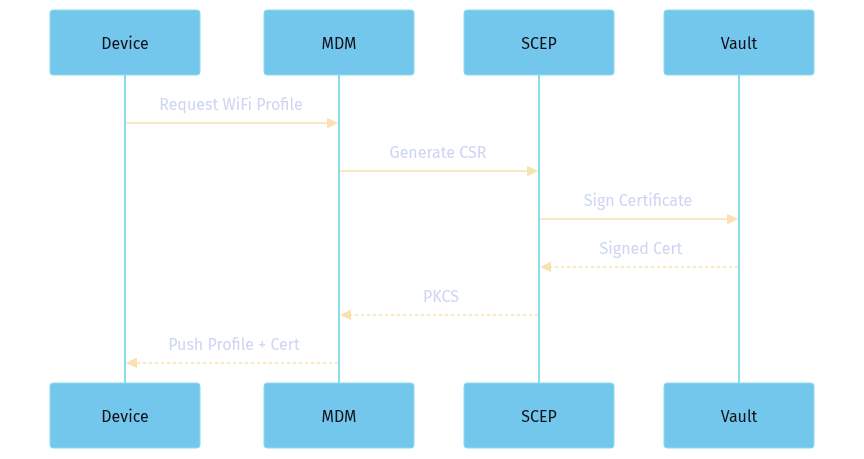
Figure 2. Certificate Enrollment Flow